
WhatsApp Business et OTP · Marketing subscription
How do I subscribe to WhatsApp marketing messages?
A monthly plan for campaigns (contacts, templates and campaigns), separate from the AI assistant subscription: three plans, terms of 1, 3, 6 or 12 months, online payment and a payment history.
Pour qui : Propriétaire et responsable
Où : Sidebar → WhatsApp Business → Numbers & wallet → Marketing plan

Étapes
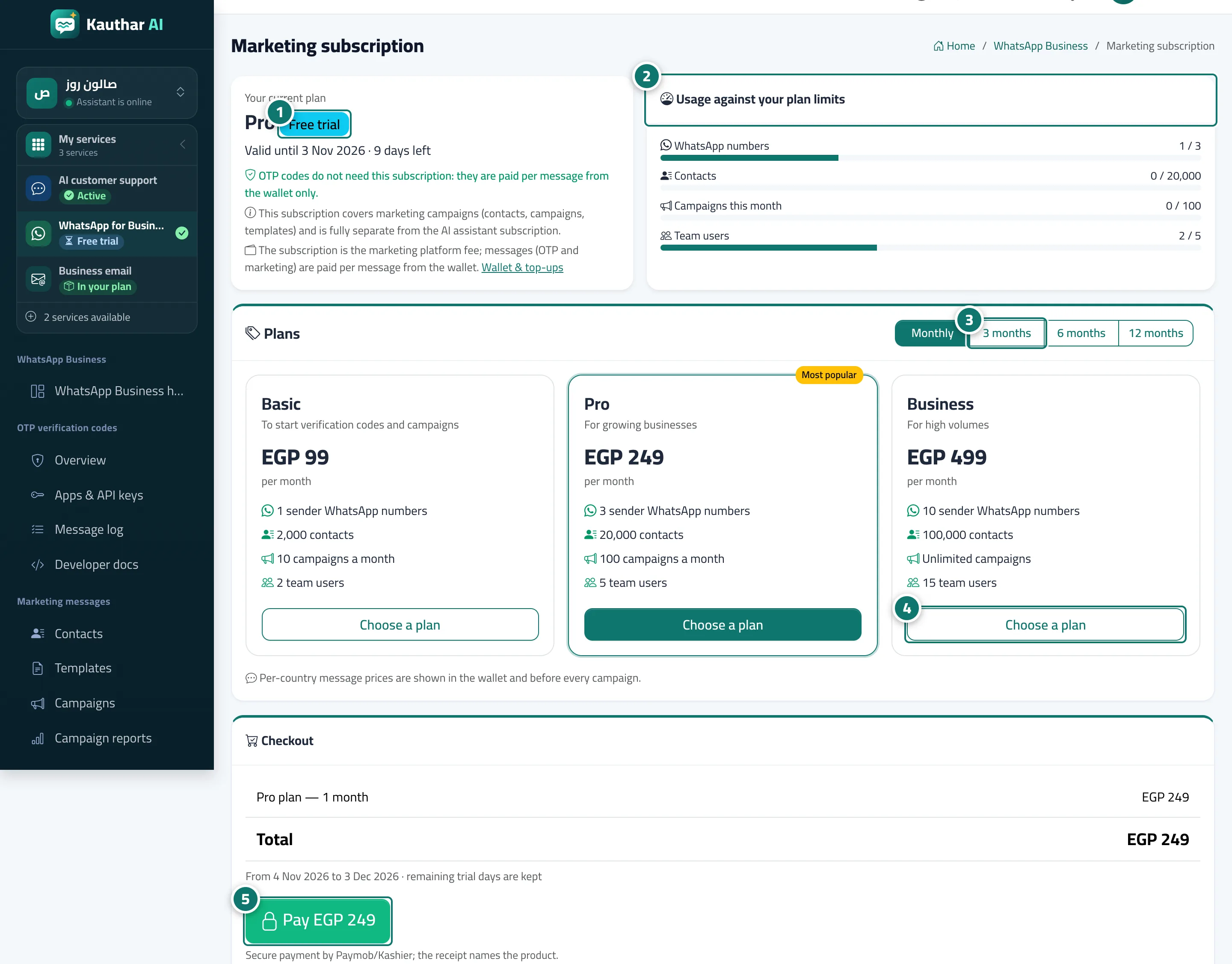
- Review "Your current plan" and the days left. Numéro 1 sur l’image
- Review "Usage against your plan limits". Numéro 2 sur l’image
- Choose the term: monthly, 3, 6 or 12 months. Numéro 3 sur l’image
- Click "Choose a plan" on the plan that suits you. Numéro 4 sur l’image
- Review the period and total under "Checkout" and click "Pay". Numéro 5 sur l’image
Étapes
- Review "Your current plan" and the days left. Numéro 1 sur l’image
- Review "Usage against your plan limits". Numéro 2 sur l’image
- Choose the term: monthly, 3, 6 or 12 months. Numéro 3 sur l’image
- Click "Choose a plan" on the plan that suits you. Numéro 4 sur l’image
- Review the period and total under "Checkout" and click "Pay". Numéro 5 sur l’image