
The problem
The assistant quotes an old price, or a product that's sold out
The price file is updated every month while the store changes every day, so the assistant promises an unavailable product or a pre-sale price, and the customer loses trust.
Stores & websites
No product file to upload or update: connect your store once and Kauthar reads the name, price, discount, availability, photo and options, and shows the customer a card with the product photo, its price and a buy button. Change a price in your store and it changes in the reply.
Just type your number — Kauthar messages you on WhatsApp and sets up your account with you.
Read the user guide Try Kauthar now
Your Kauthar account is free — no time limit, no credit card. Then turn on the services you need.

The problem
The price file is updated every month while the store changes every day, so the assistant promises an unavailable product or a pre-sale price, and the customer loses trust.
The solution with Kauthar
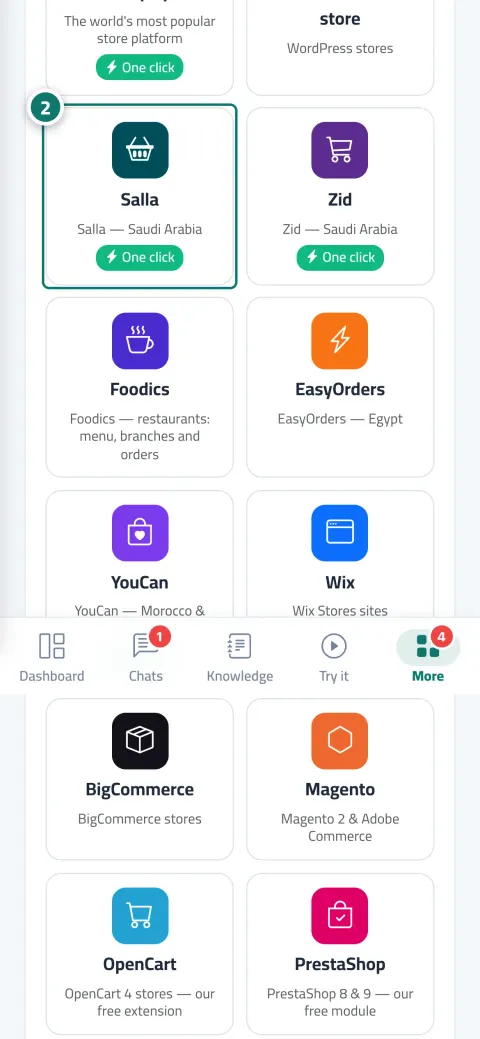
Choose your platform from the “Choose your store platform” card, or “Product feed” (XML, CSV or JSON such as Google Merchant) or “Website” to read its public pages. Each source has a card with its status, last sync and product count, plus “Sync now”, “Test connection” and “Turn on instant updates” buttons where available.
What you gain
The official Kauthar app on each platform: approve in the platform's window and come back, without copying any key; keys renew automatically and a “one-click” badge appears.
WooCommerce with the Kauthar plugin, Wix with the Kauthar app, EasyOrders, BigCommerce and Magento with a key, OpenCart, PrestaShop and Odoo with the Kauthar extension, and Foodics for restaurants.
The customer sees the product with its photo, current price, discount, availability and a buy button; a product without a price shows “Price on request”, and a plain website replies with an “Open page” button.
Automatic daily sync or instant in one click, and if it fails, replies continue from the last successful data with the reason in plain words and an alert to you.
Three steps
Open “Connect your store and website” and choose your platform, then “Connect in one click” or enter the connection details.
Wait for the first sync; the products appear as one file in the knowledge base and you can preview what Kauthar learned.
Ask about a product from “Try the assistant” to see the card with its photo, price and button.
Step-by-step instructions with numbered screenshots in the user guide
Inside the product
Screenshots of a demo business; names and numbers are examples.


Real examples
The merchant installs the Kauthar app from the Salla app store, sync is received automatically, and the assistant answers “Do you have size L?” from the store's real stock.
The my-shop.myshopify.com address and an approval, and “Turn on the chat bubble on your store” adds the Kauthar bubble from the theme editor with no code.
Items with each branch's prices, add-ons and sizes, branches with their hours and delivery areas, and the assistant answers “Where's the nearest branch?” from the restaurant's real data.
FAQ
Yes, with the automatic daily sync or instantly when you click “Sync now”. And for orders from the chat, the price is always calculated from the store at the moment of ordering.
They're stored encrypted, only their last 4 characters are shown, and they're only sent over a secure connection (https).
Up to 5 sources per business, and each source counts as one file toward your plan's knowledge-base file limit. A plain website up to 60 public pages.
The connection reads products (and orders where the platform allows). Edits to product pages happen only within the “Visibility” service if you subscribe to it, and every edit is logged and can be undone.
The connection keys are wiped, sync stops, you get a notification and the card shows “Disconnected”; reinstalling restores the connection.
Connect it through “Product feed” (XML, CSV or JSON) or “Website” to read the public pages. ExpandCart is “Coming soon”.

Your Kauthar account is free — no time limit, no credit card. Then turn on the services you need.
Explore the dashboard with a ready demo account
No credit card Pay only for the services you use Live in minutes