Your social pages train your assistant by themselves
Years of posts and replies on Facebook and Instagram? Mr. Analyst reads them, extracts what concerns your products, services and the way you reply, and adds it to the knowledge base — and every price or number waits for your approval first.
Your Kauthar account is free — no time limit, no credit card. Then turn on the services you need.
kautharai.com
The problem and the solution
The problem
All your business information exists — on your pages, not in a file
You've answered the same question hundreds of times in comments and messages, and announced every product in a post. Moving all of that into a file by hand is weeks of work nobody will do.
The solution with Kauthar
Automatic analysis after connecting, then every week
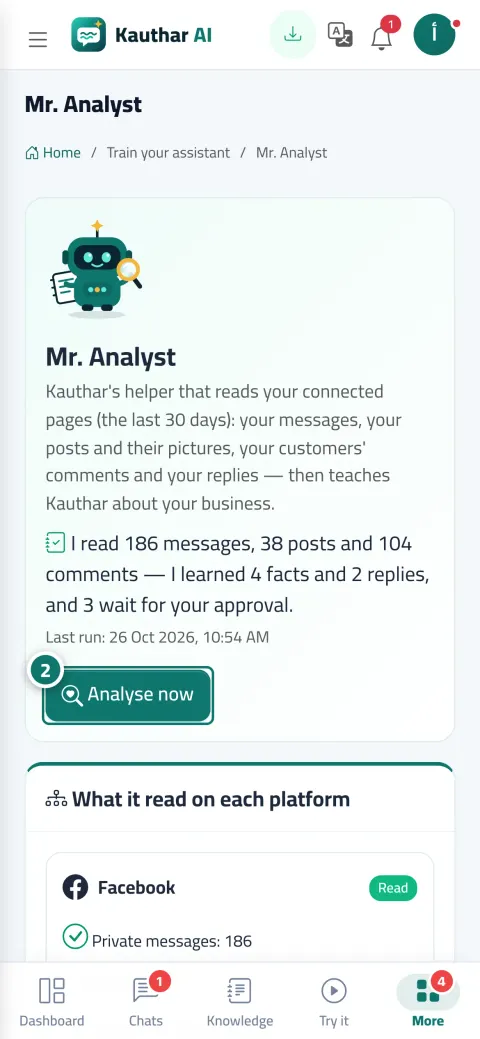
After you connect your page, analysis starts within minutes and then repeats weekly or when you click “Analyse now”. It shows what was read from each platform, “Facts learned”, “Fixed answers from your own replies”, “What your customers ask most” and “Your business's writing style”.
What you gain
What your business gets
Facts with their source and a remove button
Every fact added to the “Learned by Mr. Analyst” file carries its sources, and what you remove isn't suggested again in future analyses.
Your own replies become fixed answers
The way you answer “Do you deliver?” in comments becomes a fixed answer in your wording, shown to you before use if it contains numbers or differs from your files.
Anything sensitive waits for your approval
Any price, phone number, address, date or discount, and anything that differs from what's in your files, appears in “Waiting for your approval” with both versions side by side, to approve, edit or reject.
Kauthar writes in your style
Mr. Analyst analyses your writing style, and one click on “Apply to the assistant's style” makes Kauthar write to your customers the way they're used to from you.
Three steps
How it works
01
Connect your Facebook Page and Instagram from “Channels”, or TikTok and LinkedIn from the Post studio.
02
Open “Mr. Analyst” and click “Analyse now” or wait for the automatic analysis, and review each platform's card.
03
Approve what's in “Waiting for your approval”, remove what you don't want, and apply your style to the assistant.
Screenshots of a demo business; names and numbers are examples.
Waiting for your approval — confirming what Mr. Analyst learned
Real examples
How your business uses it
Store
Hundreds of product posts and your replies to “How much?” become facts and fixed answers within days, and every price passes by you first for approval.
Restaurant
Menu items from Instagram posts, opening hours from your replies to comments, and your friendly way of replying becomes Kauthar's style.
Salon
Your replies to “Do I need to book in advance?” and “How much is colouring?” in direct messages become approved answers, and the prices wait for your confirmation because they change.
Only what the platforms officially allow: Facebook and Instagram after Meta approves the Kauthar app's permissions, company pages on LinkedIn, TikTok videos if you grant permission to read them, and Threads once its connection is enabled. It shows you clearly what was read, what wasn't, and why.
Are my customers' messages and personal details stored?
No. Customers' personal details (names, numbers, addresses and email) are removed before analysis, and the messages themselves aren't stored; only the source links are kept.
Will Kauthar use a price Mr. Analyst found without my knowledge?
No. Any price, number, address, date or discount, and anything that differs from your files, isn't used before you approve it in “Waiting for your approval”.
How many direct messages does it read?
Meta allows reading only the last 20 messages of each conversation, and Mr. Analyst reads the last 30 days of activity.
What if I remove a fact it learned?
It's removed from the knowledge base and Mr. Analyst won't add it again in future analyses, and an item rejected in “Waiting for your approval” isn't suggested again.