
The problem
Generic AI-written content that mentions things you don't offer
Articles copied from the internet or inventing services and prices, nobody knows what customers actually search for, and product pages with no description for years.
Google visibility
Ideas from the customer questions you've answered, Google keywords close to page one, AI gaps, and what your competitors cover and you don't. Every draft is written from your knowledge only, with a report showing what was removed because it isn't in your sources — and you approve before publishing.
Just type your number — Kauthar messages you on WhatsApp and sets up your account with you.
Read the user guide Try Kauthar now
Your Kauthar account is free — no time limit, no credit card. Then turn on the services you need.

The problem
Articles copied from the internet or inventing services and prices, nobody knows what customers actually search for, and product pages with no description for years.
The solution with Kauthar
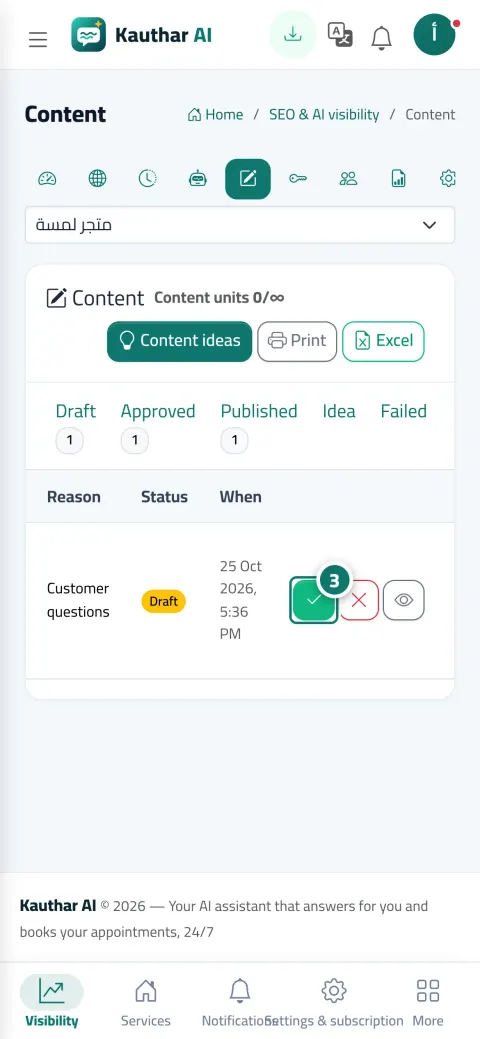
The “Content” screen with Draft, Approved, Published, Idea, Rejected and Reverted tabs. “Approve” and “Reject” on the draft's row, and “Publish now” after approval on a site that can publish. And the “Competitors” screen reads up to 40 pages per competitor weekly and compares your coverage: covered, weak, not covered.
What you gain
Customer questions you've answered, Search Console keywords close to page one, AI gaps and thin pages, and the topics your competitors cover.
Every draft from your knowledge only, with a report showing what was removed because it isn't in your sources, and an article that lost a large part is held for review.
“Publish now” only appears after “Approve”, after approval the article is published at its time, and on a site that doesn't allow publishing it becomes “Ready to publish by hand”.
Products with no description or title get an SEO title, description and product description from their data in Salla, Zid and YouCan, with before and after values and a “Restore previous description” button, and “Conflict” if you change them yourself later.
Three steps
Open “Content” → “Idea” and review the ideas, or add your competitors in “Competitors”.
Review the draft and the fact-check report, then “Approve” or “Reject”.
The article is published at its time on your site, and you follow “Content” → “Published” and “Reverted”.
Step-by-step instructions with numbered screenshots in the user guide
Inside the product
Screenshots of a demo business; names and numbers are examples.


Real examples
80 products with no description on Zid get titles and descriptions in Arabic and English from their data, and the merchant restores any description they don't like in one click.
“How much is annual air-conditioning maintenance?” was asked in the chat ten times, so it becomes an article idea from the price list and is published after approval.
A competitor covers “online accounting courses” and the site doesn't; it shows as “not covered” and Kauthar writes an article from the courses file every week.
FAQ
Because it only appears after approval, and on a site that can publish. A plain website shows “Ready to publish by hand” with instructions to publish it yourself.
No; they're phrases from competitors' page titles, descriptions and links, and search volumes and real Google rankings need a data provider (coming soon). A site that blocks reading in robots.txt isn't read.
The number of generated articles and pages per month depends on your plan, a regeneration counts as one unit, and the number of competitors depends on your plan.
It shows “Conflict” and nothing is touched, and if the platform revokes the permission you're asked to approve the app again.
Yes, they're approved on their own and carry an “Automatic” or “Published automatically” badge, and you can choose “Approve before publishing” in the advanced settings or undo any article.

Your Kauthar account is free — no time limit, no credit card. Then turn on the services you need.
Explore the dashboard with a ready demo account
No credit card Pay only for the services you use Live in minutes