
The problem
Your customers ask Google and AI, and your site is silent
Missing titles, images with no description, pages with no structured data, a competitor mentioned in the AI answer instead of you, and nobody has time to learn SEO.
Google visibility
A page per site shows the health and visibility scores out of 100, and a “Kauthar is running automatically” bar with today's fixes, published content and the next AI check. A questions × engines matrix tells you where you're mentioned and where your competitors appear instead of you.
Just type your number — Kauthar messages you on WhatsApp and sets up your account with you.
Read the user guide Try Kauthar now
Your Kauthar account is free — no time limit, no credit card. Then turn on the services you need.

The problem
Missing titles, images with no description, pages with no structured data, a competitor mentioned in the AI answer instead of you, and nobody has time to learn SEO.
The solution with Kauthar
Once site ownership is verified and your business information is in the knowledge base, Kauthar starts on her own: she audits the pages gradually, respecting robots.txt, then fixes, writes and publishes on the sites that allow it (WordPress, Shopify, Salla, Zid, YouCan). Every change is in the “Change log” with its before and after values.
What you gain
Site health out of 100, open and fixed issues, the number of daily changes depending on your plan, and “Stop automatic mode” at any moment or “Approve before publishing”.
Questions generated from your business profile and your customers' real questions, and an engines × rounds matrix: whether your name was mentioned, in what position and whether your site was cited, plus “Gaps” with a “Write content for this” button.
Every change is recorded with its before and after values and can be undone in one click, and an article whose fact check removed a large part is held for review.
Clicks, impressions and ranking per keyword from a Google account with Search Console permission only, an automatic sitemap and speed measurement, and a weekly report with the difference from last week and the next steps.
Three steps
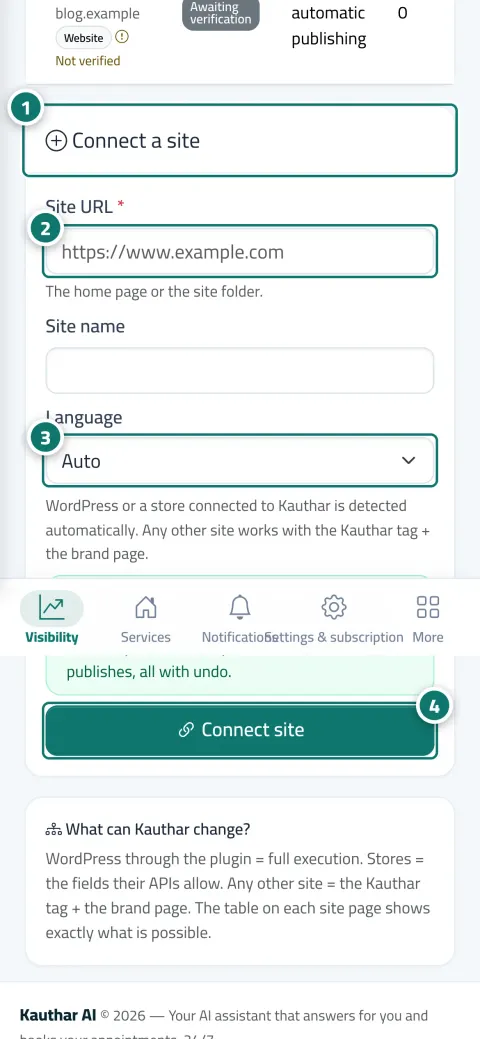
From “Sites”, add your site or connected store and verify ownership.
Make sure your business information is in the knowledge base; Kauthar starts automatically.
Connect Search Console and follow the weekly report and the “Change log”.
Step-by-step instructions with numbered screenshots in the user guide
Inside the product
Screenshots of a demo business; names and numbers are examples.


Real examples
A Salla store connected to Kauthar: products with no description get an SEO title and description from their data, and every change can be reverted.
“Best dental clinic in town?” in the AI matrix shows as not mentioned, so Kauthar writes a questions page from the clinic's information to close the gap.
A WordPress site: title and description fixes after approval inside the plugin, and the weekly report shows Google clicks compared with the previous month.
FAQ
No. She sends one request at a time with a pause between requests, respects robots.txt and Crawl-delay, and identifies herself as KautharBot.
Yes: “Stop automatic mode” on the site page, or “Off” in the advanced settings, or “Stop all writes” from the WordPress plugin.
Out of 100 = 50% mention rate + 30% rate of citing your site + 20% mention position, per engine then averaged. The number of questions, engines and checks depends on your plan.
Articles reach you as “Ready to publish by hand” with instructions to publish them yourself, and the fixes remain as recommendations ready to copy.
The separate “Kauthar SEO” client with Search Console permission only, and Google's data is naturally two to three days behind.

Your Kauthar account is free — no time limit, no credit card. Then turn on the services you need.
Explore the dashboard with a ready demo account
No credit card Pay only for the services you use Live in minutes