
The problem
One design doesn't fit the story, the post and TikTok at once
The wide image gets cropped in the story, the text disappears behind the app's buttons, the old price stays on the design, and every edit means going back to the designer.
Social media
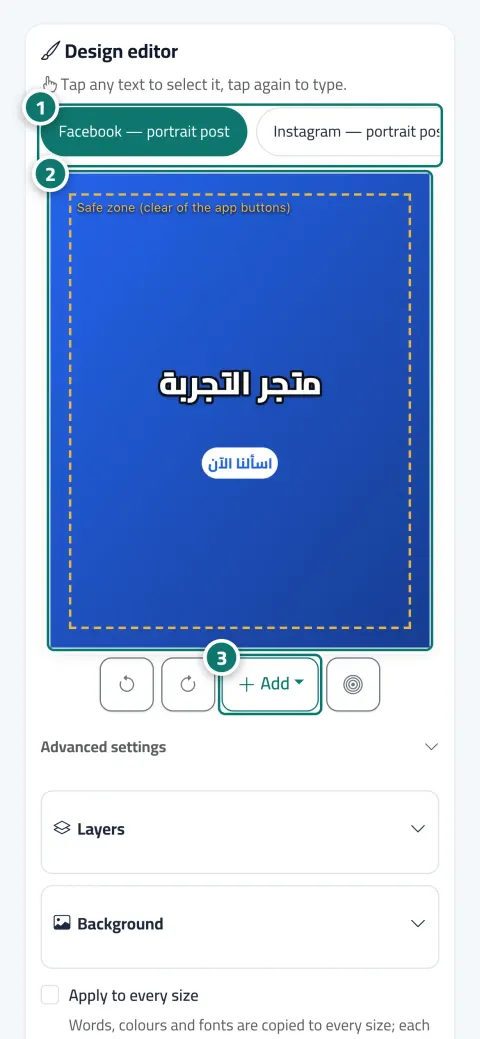
Tap any text on the image to edit it, drag it to move it, and add a price, a button or your logo. Post, story, TikTok, square and WhatsApp status sizes are ready with a “safe area”, and “Apply to every size” takes one click.
Just type your number — Kauthar messages you on WhatsApp and sets up your account with you.
Read the user guide Try Kauthar now
Your Kauthar account is free — no time limit, no credit card. Then turn on the services you need.

The problem
The wide image gets cropped in the story, the text disappears behind the app's buttons, the old price stays on the design, and every edit means going back to the designer.
The solution with Kauthar
Layers, background and focus point, text properties (font, size, colour, outline, shadow, background, rotation, and entrance animation in the video), undo and redo, and “The final image as it will be published”. Three template layouts: image and strip, full image, card and price.
What you gain
Facebook portrait post, Instagram story, TikTok, LinkedIn square, WhatsApp status, and a safe area away from the app's buttons in every size.
Text, price, button, logo and shape, in your brand colour, with an automatic background, your brand colour or a photo, and “Dim for readable text”.
The “Preview” tab shows a slide per platform at its real size, and “Text” shows each platform's text with copy, save and “Rewrite”.
“Animate”: frames, duration, transition, text motion and music from Kauthar's library or your own, then “Make the video” for reels, TikTok and YouTube Shorts.
Three steps
Open the post → the “Design” tab and choose the size.
Tap the text to edit it, add the price or logo, then “Apply to every size” and “Save design”.
Check “Preview” for every platform, or make the video from the “Video” tab, then approve.
Step-by-step instructions with numbered screenshots in the user guide
Inside the product
Screenshots of a demo business; names and numbers are examples.

Real examples
The “Card and price” template with the offer price on the product photo, and the price is updated across every size in one click before publishing.
The full dish photo with a short text and a light dim so the name stays readable in the story, then a short video with music for TikTok.
The agency's logo and a “Book a viewing” button on the unit photo, at story size for Instagram and square size for LinkedIn.
FAQ
No, the design of a published or publishing post can't be edited; duplicate it as a new post and edit that.
It restores the current size's design as Kauthar created it, and your edits to that size are lost. Changing the template or image also rebuilds the design.
Every successful video from “Animate” counts once against the video allowance, and failures don't count; animation is available on plans that include video.
Yes, after confirming you have the right to use it, or choose from Kauthar's library.
Up to 5 times per post Kauthar wrote, and each time counts as a post against the month's allowance.

Your Kauthar account is free — no time limit, no credit card. Then turn on the services you need.
Explore the dashboard with a ready demo account
No credit card Pay only for the services you use Live in minutes