
The problem
Publishing happens when someone remembers, not when your audience is there
Several posts in one day then a week of silence, random publishing times, and no plan reviewed once with the team.
Social media
“Prepare the month plan”: the number of posts, the mix of goals, the channels and the share of video, and the drafts appear one after another in the calendar at suggested times. Review, drag to change a day, select all and click “Approve & schedule” — and every post goes out at its time automatically.
Just type your number — Kauthar messages you on WhatsApp and sets up your account with you.
Read the user guide Try Kauthar now
Your Kauthar account is free — no time limit, no credit card. Then turn on the services you need.

The problem
Several posts in one day then a week of silence, random publishing times, and no plan reviewed once with the team.
The solution with Kauthar
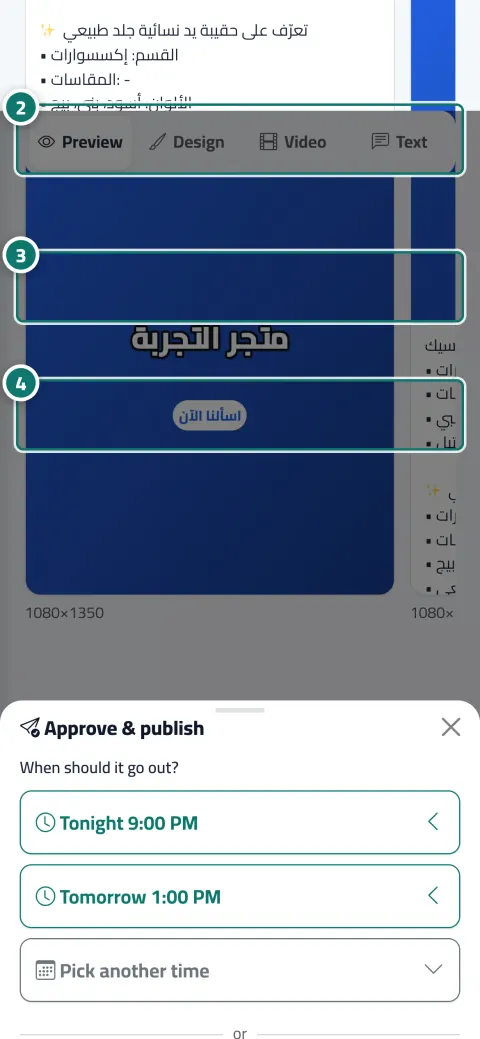
“Approve & schedule” with ready times (tonight 9:00 PM, tomorrow 1:00 PM, best time) or a time you choose in your business's time zone. The calendar in list, week and month views with status colours and a channel filter. A month plan of up to 60 drafts, and a campaign with a separate post per product with the same goal and style.
What you gain
Publishing now runs in the background and each platform's status refreshes every 5 seconds, and scheduled posts go out automatically at their time with up to 4 retries on a temporary error.
Drag any post to another day, a “+” button on any upcoming day, and bulk selection of up to 200 posts: approve and schedule, unschedule, delete. With Excel and A4 printing.
A mix of goals by percentage (introduction, offer and price, tip, trust, common question), and a “Before you start” card showing what will be used from your allowance and warning you if your information isn't enough for that many posts without repetition.
Pick up to 4 products with “Campaign (one post per item)” and Kauthar writes a separate post for each product in the background, for you to review from the calendar.
Three steps
Open “Month plan”, set the number, mix and channels, and click “Prepare the month plan”.
In “Calendar”, review the drafts, drag any to another day, and edit what's needed from each post's page.
Select all and click “Approve & schedule”, then follow the automatic publishing at the set times.
Step-by-step instructions with numbered screenshots in the user guide
Inside the product
Screenshots of a demo business; names and numbers are examples.


Real examples
A 20-post plan for the month: 40% offers, 30% product introductions and 30% common questions, reviewed in one sitting and scheduled at the suggested times.
A campaign for four new dishes with a separate post per dish, then spread across the days of the week by dragging in the calendar.
Course posts scheduled at the “Best time” Kauthar suggests, and the month's calendar printed to A4 for the marketing meeting.
FAQ
No. They're prepared as drafts with suggested times, and nothing is published before you approve or schedule it.
No. The allowance is counted only when Kauthar writes the post, and every post in the plan or campaign counts as one post.
The number is reduced automatically to your remaining allowance, and the “Before you start” card shows the numbers and the allowance before you begin.
Until you connect every platform selected in the post; a message shows the missing platforms and a link to “Connected accounts”.
No, they're saved as drafts and you schedule them from each post's page or with “Approve & schedule” in the calendar (at the suggested times).

Your Kauthar account is free — no time limit, no credit card. Then turn on the services you need.
Explore the dashboard with a ready demo account
No credit card Pay only for the services you use Live in minutes