
The problem
Comments pile up, and the price is asked twenty times under the same post
An unanswered comment means a lost customer and a competitor replying privately, annoying comments stay visible, and nobody is watching YouTube at all.
Social media
“How much?” and “Do you deliver?” under every post. Kauthar gathers them from Facebook, Instagram and YouTube on one screen and replies from your information publicly or privately, or suggests the reply for you to review — and alerts your team when she doesn't know the answer.
Just type your number — Kauthar messages you on WhatsApp and sets up your account with you.
Read the user guide Try Kauthar now
Your Kauthar account is free — no time limit, no credit card. Then turn on the services you need.

The problem
An unanswered comment means a lost customer and a competitor replying privately, annoying comments stay visible, and nobody is watching YouTube at all.
The solution with Kauthar
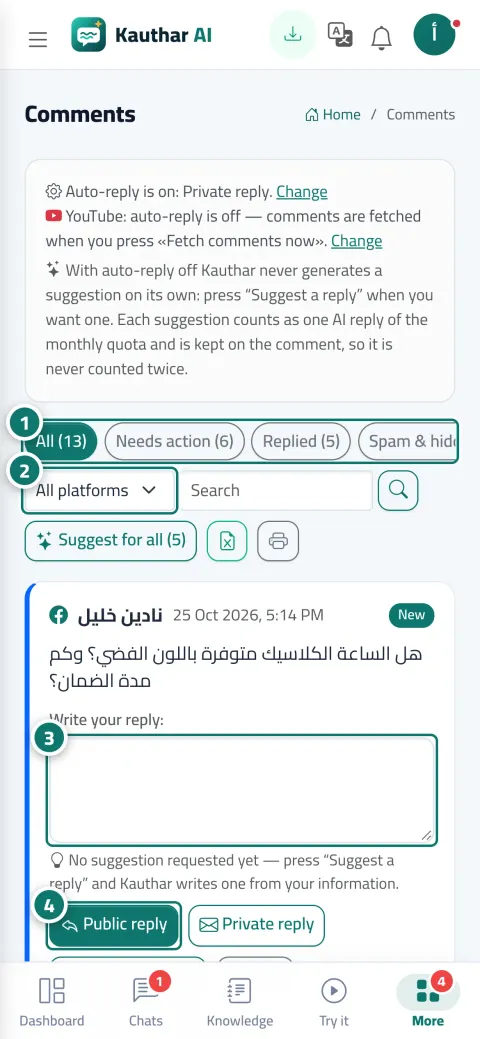
“All”, “Needs action”, “Replied” and “Spam & hidden”, with search and a platform filter. Every comment is a card in its platform's colour with its status (new, replied publicly, replied privately, team notified…). And you choose: automatic replies from your information, “Suggest a reply” on request, or notify the team only.
What you gain
Comments on your Page's, account's and channel's posts (and LinkedIn for company pages once approved) in one list, with the post link and a “Fetch comments now” button.
From the knowledge base and fixed answers through Kauthar's cloud engine (Google Gemini), in the comment's language, and the heading says whether Kauthar found a confirmed answer or not, so you can review before sending.
A short reply under the comment, or a public line plus a private message with the full answer, or hide and delete the annoying ones; and “Suggest for all” writes a reply for every visible comment.
Fully automatic replies, a suggestion you review, or an alert to the team only; turning off automatic replies doesn't disconnect anything.
Three steps
Connect your Facebook Page and Instagram from “Channels” and YouTube from “Accounts”.
Choose the reply method: automatic, a suggestion on request, or notify the team only.
Open “Comments” → “Needs action”, and click “Suggest a reply” or write your reply and send it.
Step-by-step instructions with numbered screenshots in the user guide
Inside the product
Screenshots of a demo business; names and numbers are examples.

Real examples
“How much?” under the product post: a public line “We've sent you the details privately” and a private message with the price and link, automatically from the price list.
YouTube comments on the new dish video get public replies with the dish's ingredients from the menu, and the annoying comment is hidden in one click.
Automatic replies are off; the secretary reviews every comment and clicks “Suggest a reply”, then edits and sends, and the doctor is alerted to any medical question.
FAQ
Only if you turn on automatic replies; then she replies when she finds an answer in your information and alerts your team otherwise. With it off, every comment waits for your approval.
Yes, every new suggestion counts as one reply from the monthly AI reply allowance, and “Suggest for all” works on up to 20 comments at a time.
No, YouTube and LinkedIn don't allow private replies for apps, and LinkedIn doesn't allow hiding comments.
Because TikTok doesn't make comments or messages available to regular apps, so there are no automatic replies there.
Yes, it deletes it from the platform permanently; use “Hide” if you want it out of sight without deleting it.

Your Kauthar account is free — no time limit, no credit card. Then turn on the services you need.
Explore the dashboard with a ready demo account
No credit card Pay only for the services you use Live in minutes