
WhatsApp Business & OTP · Campaign report
How do I know how many people read my campaign message?
Each campaign's results in detail: recipients, sent, delivered, read and failed, sending by hour, wallet, failure reasons, breakdown by country and the message table.
Who this is for: Owner & manager · Team members
Where: Sidebar → WhatsApp Business → Marketing messages → Campaigns → campaign name

Steps
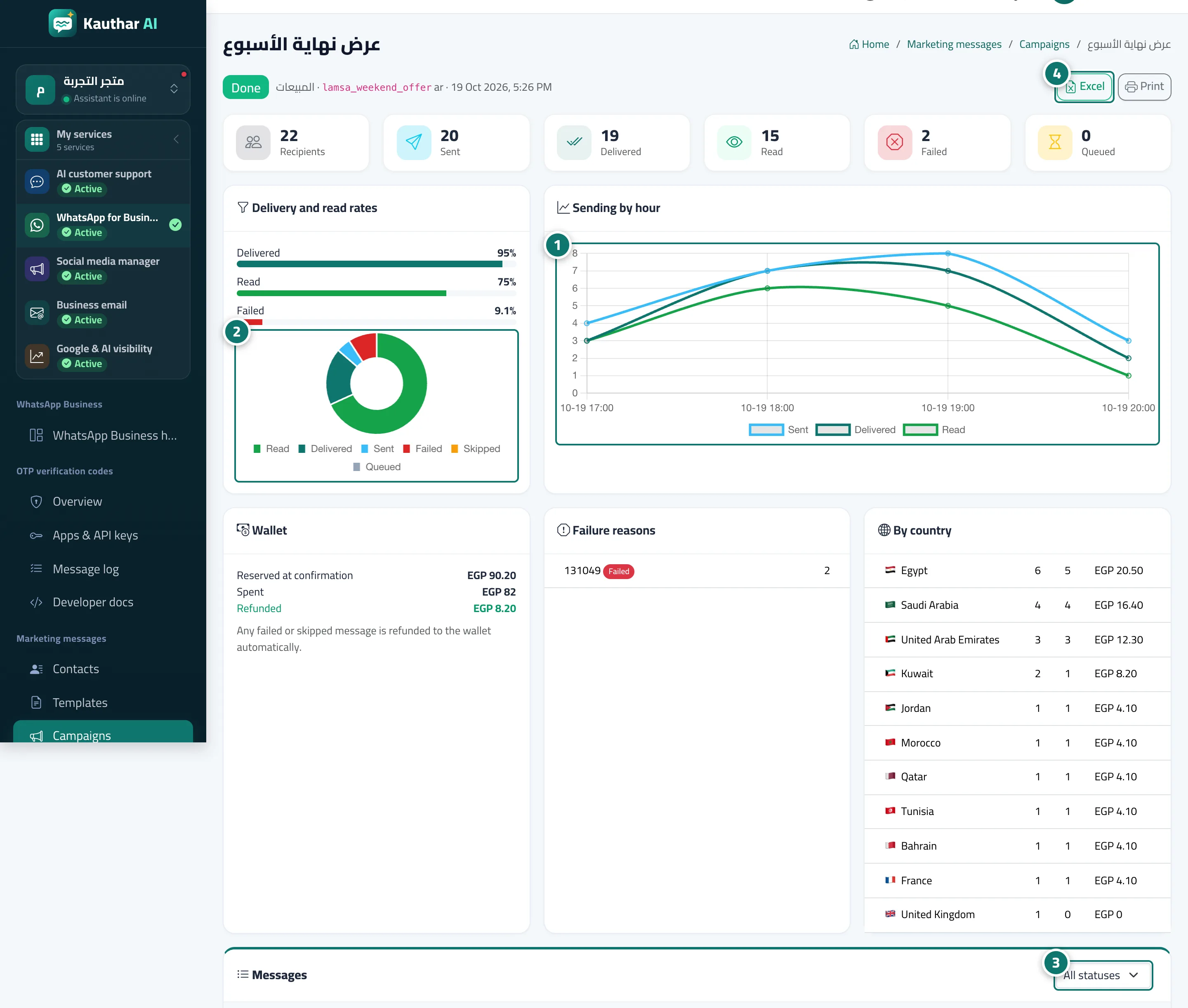
- Review the "Sending by hour" chart. Number 1 on the picture
- Review "Delivery and read rates". Number 2 on the picture
- Review "Wallet", "Failure reasons" and "By country". Number 3 on the picture
- Filter the "Messages" table by status, or export it to Excel. Number 4 on the picture
Steps
- Review the "Sending by hour" chart. Number 1 on the picture
- Review "Delivery and read rates". Number 2 on the picture
- Review "Wallet", "Failure reasons" and "By country". Number 3 on the picture
- Filter the "Messages" table by status, or export it to Excel. Number 4 on the picture