
WhatsApp Business & OTP · Developer docs for the OTP API
Where can my app developer find the verification-code API documentation?
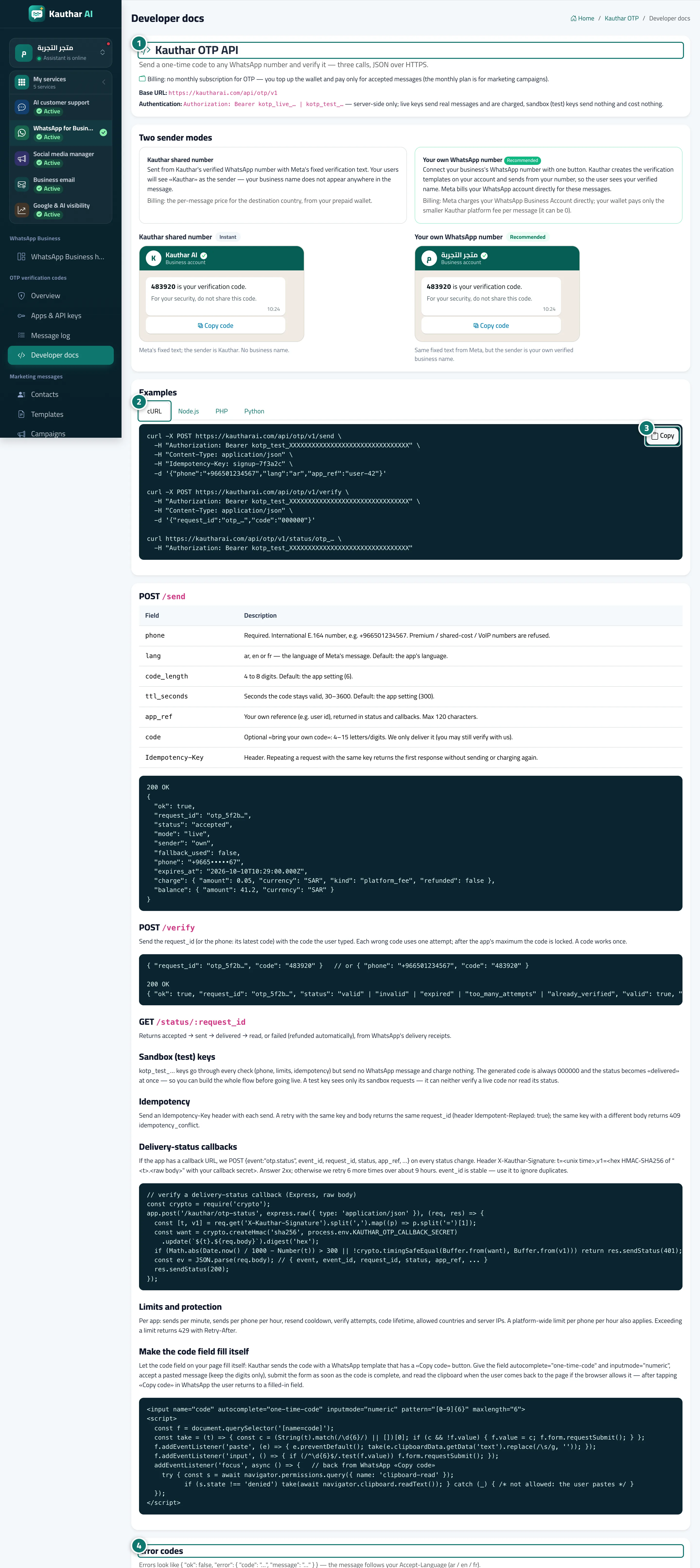
The API guide inside Kauthar: send, verify and status, copy-ready examples in four programming languages, sandbox keys, idempotency, callbacks, limits and error codes.
Who this is for: Team members
Where: Sidebar → WhatsApp Business → OTP verification codes → Developer docs

Steps
- Read the base URL and the authentication method. Number 1 on the picture
- Pick your programming language from the "Examples" tabs. Number 2 on the picture
- Click "Copy" to copy the example and replace the key with your sandbox key. Number 3 on the picture
- Check the "Error codes" table to handle each case in your app. Number 4 on the picture
Steps
- Read the base URL and the authentication method. Number 1 on the picture
- Pick your programming language from the "Examples" tabs. Number 2 on the picture
- Click "Copy" to copy the example and replace the key with your sandbox key. Number 3 on the picture
- Check the "Error codes" table to handle each case in your app. Number 4 on the picture