
Developer docs for the OTP API
The API guide inside Kauthar: send, verify and status, copy-ready examples in four programming languages, sandbox keys, idempotency, callbacks, limits and error codes.
Overview#
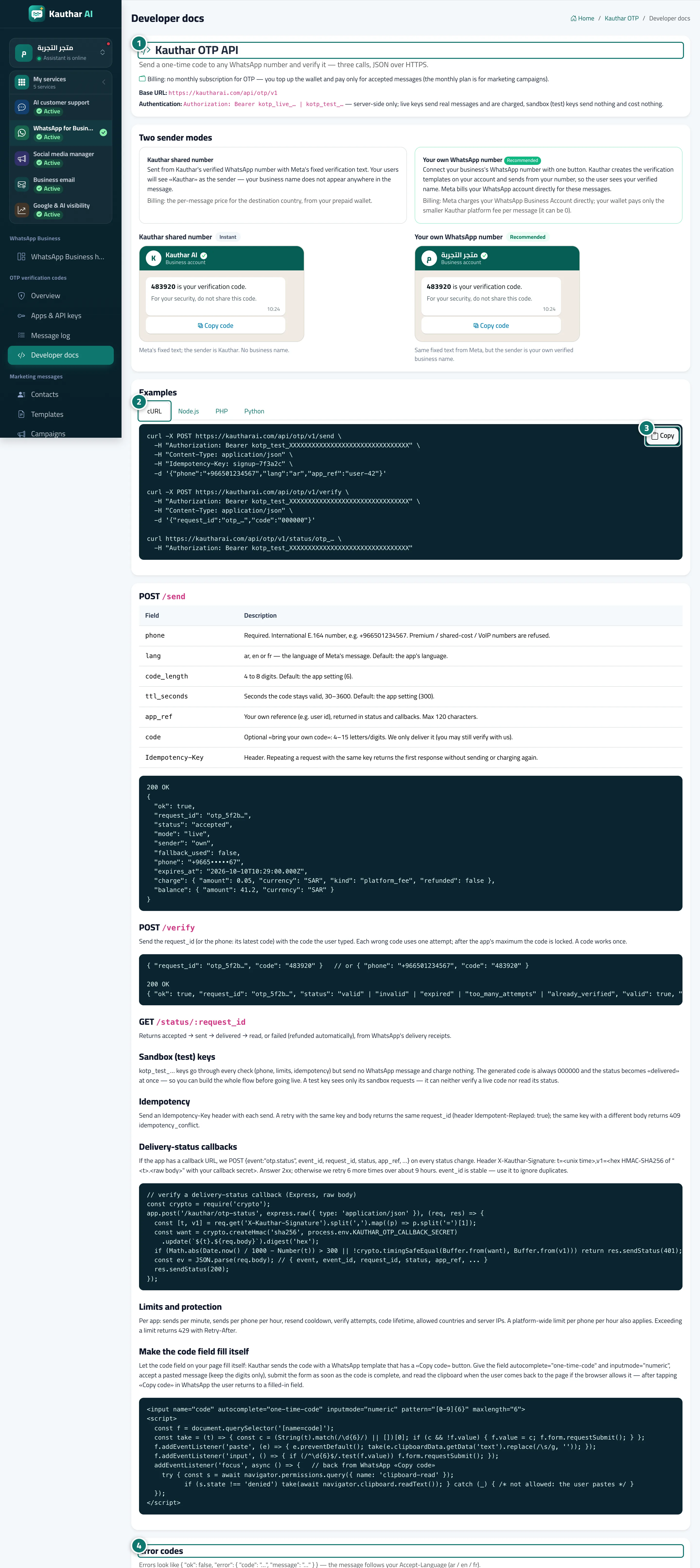
The Kauthar OTP API page: the base URL and authentication (server-side only), Who sends the codes (your own number and how it is billed), Examples with cURL, Node.js, PHP and Python tabs and a Copy button, an explanation of POST /send (fields: phone, lang, code_length, ttl_seconds, app_ref, your own code, and the Idempotency-Key header), POST /verify and GET /status/:request_id, Sandbox (test) keys, Idempotency, signed Delivery-status callbacks, Limits and protection, and the Error codes table. The page is available before activation too.
- Who can use it
- Developer / technical team
- Where to find it
- Sidebar → WhatsApp Business → OTP verification codes → Developer docs
Step by step#
- Read the base URL and the authentication method.
- Pick your programming language from the Examples tabs.
- Click Copy to copy the example and replace the key with your sandbox key.
- Check the Error codes table to handle each case in your app.

Tips#
Good to know#
Frequently asked questions#
Can I send a code I generated myself?
Yes, with the optional code field (4 to 15 letters or digits), and you can still verify it through Kauthar.