
Marketing subscription
A monthly plan for campaigns (contacts, templates and campaigns), separate from the AI assistant subscription: three plans, terms of 1, 3, 6 or 12 months, online payment and a payment history.
Overview#
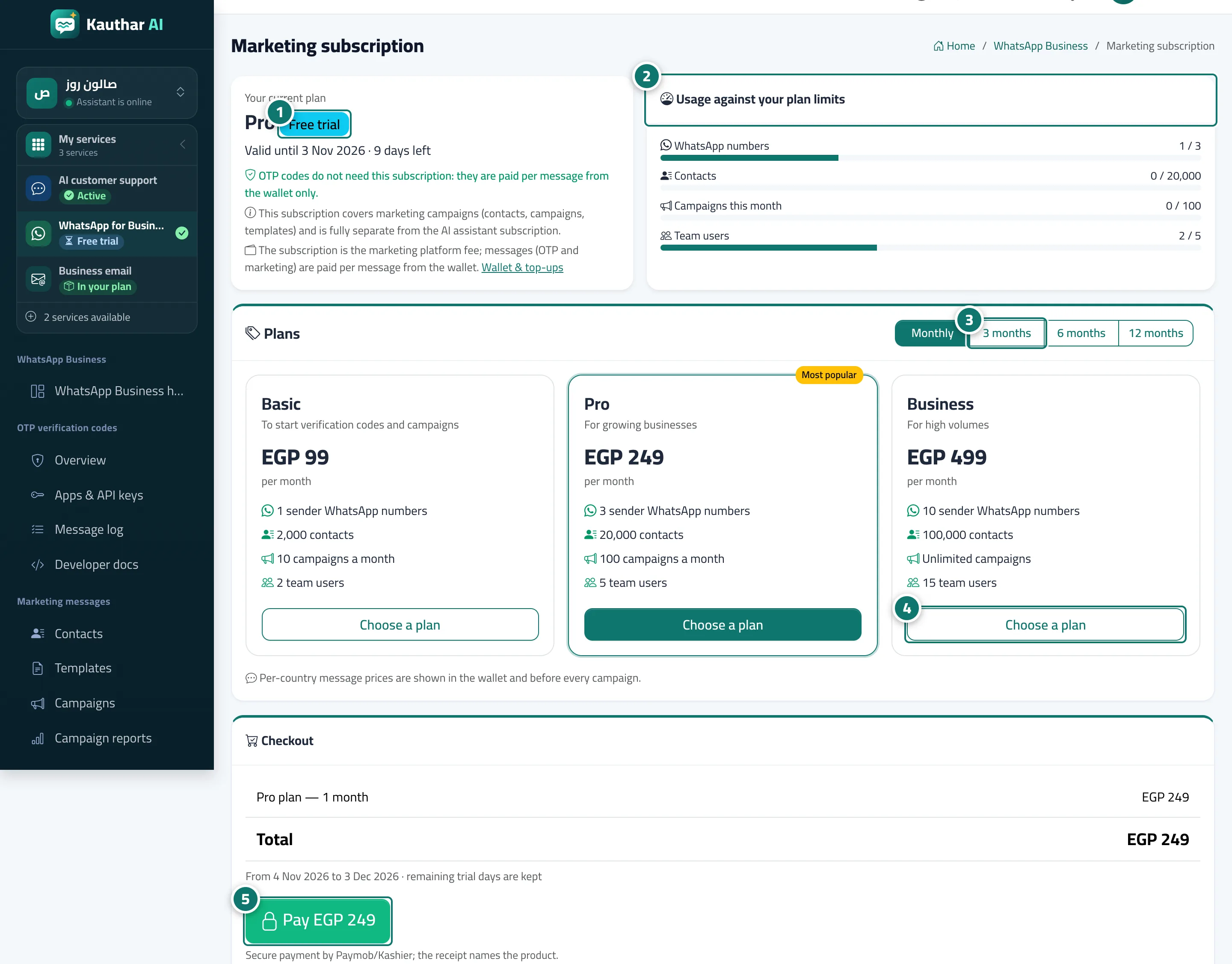
The Marketing subscription page: the Your current plan card (plan and status: active, free trial or ended, the end date and days left), the Usage against your plan limits card (WhatsApp numbers, contacts, campaigns this month, team users), the Plans card (Basic, Pro, Business) with monthly, 3, 6 and 12-month terms and the saving, the Checkout card with the period details, the total and a Pay button, and the Payment history with receipts, Excel and Print.
- Who can use it
- Business owner / manager
- Where to find it
- Sidebar → WhatsApp Business → Numbers & wallet → Marketing plan
Step by step#
- Review Your current plan and the days left.
- Review Usage against your plan limits.
- Choose the term: monthly, 3, 6 or 12 months.
- Click Choose a plan on the plan that suits you.
- Review the period and total under Checkout and click Pay.

Tips#
Good to know#
Frequently asked questions#
Is this subscription required for OTP codes?
No. OTP codes don't need this subscription; they are paid per message from the wallet only.