
App settings and API keys
On the app page you set the sending number and the fallback to the Kauthar number, protection limits, countries, IP addresses and the delivery callback URL, and you create and revoke live and sandbox keys.
Overview#
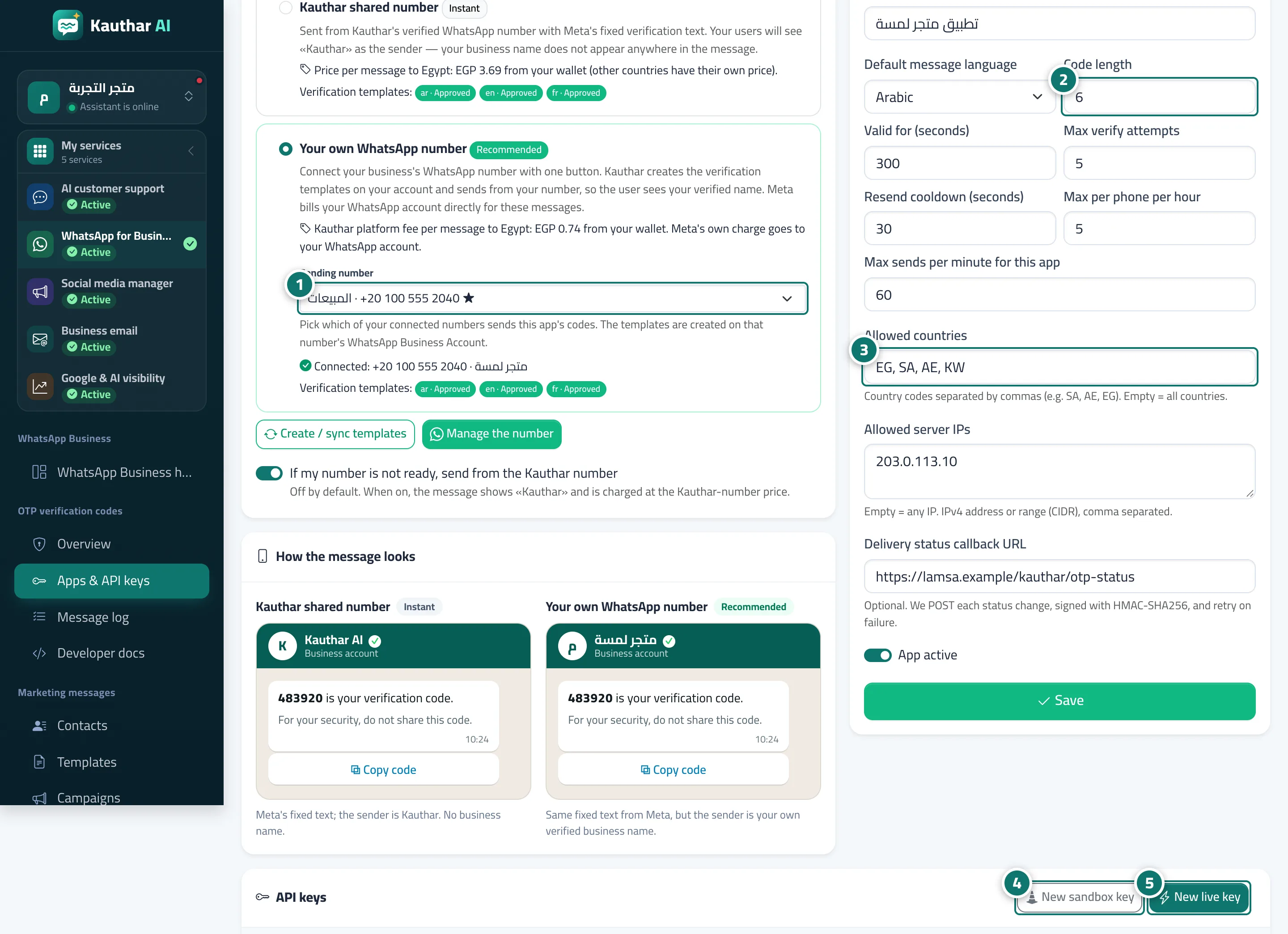
The app page has: the Who sends the message? card (your own number, the Sending number if you have more than one, the status of the verification templates on your number in Arabic, English and French with a Create / sync templates button, and the switch If my number is not ready, send from the Kauthar number); a preview of the message; the "Settings & protection" card (code length 4–8, code validity, maximum verification attempts, resend wait, maximum messages per number per hour, maximum sends per minute, allowed countries, allowed server IP addresses, the delivery-status callback URL, and App active); the API keys card with New sandbox key and New live key and the keys table (prefix and last 4 characters, created, last used) with Cancel to revoke; the Callback signing secret with New secret; and Delete app.
- Who can use it
- Business owner / manager / developer with edit permission for OTP
- Where to find it
- Sidebar → WhatsApp Business → OTP verification codes → Apps & API keys → app name
Step by step#
- Under Who sends the message? choose the sending number, and turn on the fallback to the Kauthar number if you want it.
- Set "Settings & protection": code length, validity, attempts and limits.
- Enter the allowed countries (such as SA, AE, EG), your server's IP addresses and the delivery callback URL, then Save.
- Click New sandbox key to try the whole flow with no sending and no charge.
- Click New live key when you're ready for real sending, and copy it right away.

Tips#
Good to know#
Frequently asked questions#
What do I do if a key leaks?
Click Cancel next to it: requests using it are rejected immediately. Then create a new key.