
The problem
A trial that ends after 14 days and shuts everything down
You connect your channels and upload your files, then the trial ends and messages stop arriving, or you're forced onto a full plan for one feature you need.
Account & team
A Kauthar account is completely free and never expires: your team and its permissions, connecting WhatsApp, Messenger, Instagram, Telegram and your website, a unified inbox with manual replies, bookings, tickets, customers and reports. “Kauthar AI” is the paid part of each service, with a trial you start from “My services”.
Just type your number — Kauthar messages you on WhatsApp and sets up your account with you.
Read the user guide Try Kauthar now
Your Kauthar account is free — no time limit, no credit card. Then turn on the services you need.

The problem
You connect your channels and upload your files, then the trial ends and messages stop arriving, or you're forced onto a full plan for one feature you need.
The solution with Kauthar
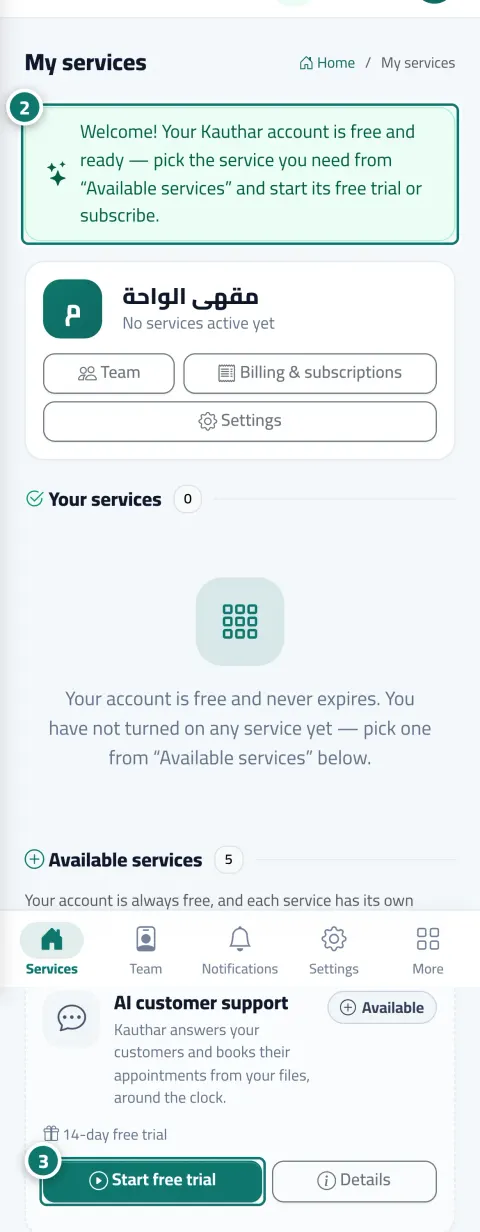
After signing up you open “My services”: AI customer support, WhatsApp Business, social media manager, business email, and Google visibility. Each service has a card with its status and free trial and a “Start the free trial” button, and when a trial ends only the AI stops while every screen stays.
What you gain
Connecting channels and your website, a unified inbox for messages, comments and emails with manual replies, writing, publishing and scheduling your own posts, manual SEO tools, bookings, tickets, customer data, reports and team.
Automatic replies, suggestions, content writing, automatic fixes and “Mr. Analyst” are the paid part, each service with its own subscription and trial, and all invoices in “Billing & subscriptions”.
Your customers' messages reach the Conversations inbox as usual, the customer sees once that a team member will reply, and your team is alerted; only automatic replies stop.
The “Pause Kauthar AI” button on any service's page stops the AI in that service alone without cancelling the subscription or changing its term, and “Turn Kauthar AI back on” restores it immediately.
Three steps
Create your account with your phone number from the website or from WhatsApp.
From “My services”, click “Start the free trial” on the service you need.
Use the free tools for as long as you like, and subscribe to Kauthar AI where it helps you.
Step-by-step instructions with numbered screenshots in the user guide
Inside the product
Screenshots of a demo business; names and numbers are examples.


Real examples
Connects WhatsApp and Instagram and replies by hand from the unified inbox for free, and tries AI customer support when the messages pile up.
Tickets, bookings and team free from day one, and business email on its own subscription when it needs mailboxes on its domain.
Publishes and schedules its own posts for free, and pauses Kauthar AI in social media during the holiday month without cancelling the subscription.
FAQ
No. The account is free with no time limit and no card; you pay only when you subscribe to a service.
No. Messages reach the Conversations inbox as usual, the customer sees once that a team member will reply, and your team is alerted. Only automatic replies stop.
Because those are pages of the “AI customer support” service. Turn it on from “My services” → “Start the free trial” and its pages appear in the menu.
No. Only that service's pages stop until you renew, and the account and the other services keep working.
No. The pause is temporary and doesn't cancel the subscription; the term stays as it is and it resumes in one click.
Mailboxes hosted on your domain and paid WhatsApp messages from Kauthar's number; and the free limits are the first plan's limits for each service.

Your Kauthar account is free — no time limit, no credit card. Then turn on the services you need.
Explore the dashboard with a ready demo account
No credit card Pay only for the services you use Live in minutes