
The problem
Signing up for a new platform means forms, passwords and endless settings
A business owner has one minute on their phone, not half an hour at a computer. And every extra setup step means an account that's opened and never used.
Account & team
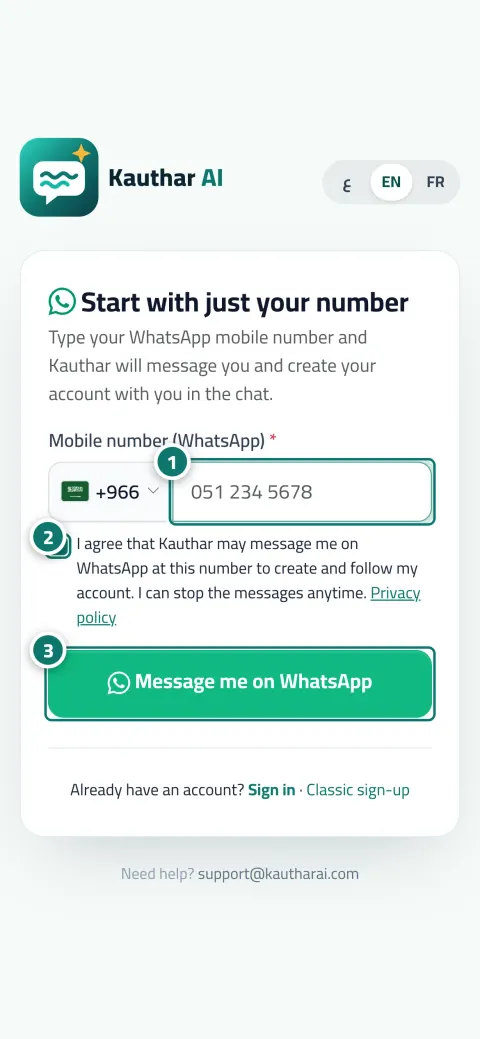
No long forms: type the phone number that has WhatsApp and click “Message me on WhatsApp”. A message arrives from Kauthar's official number, your reply verifies your number with no code screen, then she asks your name and business, creates the account and sets it up with you step by step.
Just type your number — Kauthar messages you on WhatsApp and sets up your account with you.
Read the user guide Try Kauthar now
Your Kauthar account is free — no time limit, no credit card. Then turn on the services you need.

The problem
A business owner has one minute on their phone, not half an hour at a computer. And every extra setup step means an account that's opened and never used.
The solution with Kauthar
After creation you finish the setup from WhatsApp (skip and come back any time): the services you want, connecting channels with a one-time sign-in link, your website, your files (Excel, text, photos or voice), working hours and today's appointments, then “Test me” to ask Kauthar as if you were a customer, and “Here's what I understood about you — right?”.
What you gain
Your reply to Kauthar's message proves the number is yours, with no code screen and no password inside the chat; Kauthar sends a link to the right page when needed.
Services, channels, website, files and working hours; every step is optional, and you return to it whenever you like from the menus.
“Test me”: ask Kauthar on WhatsApp as if you were a customer and she replies from your files, then shows what she understood about your business for you to confirm.
The “Create your free account” page in three steps: your number, a 6-digit code that arrives on WhatsApp with a copy button (or SMS), and your details. The account is free with no time limit and no card.
Three steps
Open “Start with your number only”, type the phone number that has WhatsApp and agree to be messaged.
Reply to Kauthar's message and type your name and business; your account is created.
Finish the setup from the chat, and click “Test me” before sharing your link.
Step-by-step instructions with numbered screenshots in the user guide
Inside the product
Screenshots of a demo business; names and numbers are examples.


Real examples
The store owner sends product photos and prices as WhatsApp messages, Kauthar builds the knowledge base from them and asks about the working hours.
From the chat: connecting the salon's WhatsApp number with a one-time sign-in link, and adding today's appointments with a confirmation for each.
A voice note explaining the services and coverage areas becomes information in the knowledge base, then “Test me” to try the replies.
FAQ
On the “Create your free account” page, click “Send me an SMS” instead of the WhatsApp button, and the same code arrives in a text message.
Yes, the account is free with no time limit and no credit card; each service has its own subscription and free trial, which you start from “My services”.
No. Daily sign-in is with your phone number and password (or your linked Google account). The code is only for sign-up, password recovery and number verification.
No; Kauthar's number is for managing your account only, and your customers contact you on your own business number.
You see a page with a one-tap WhatsApp button that opens a chat with Kauthar with a ready message, and attempts are limited per number per hour.

Your Kauthar account is free — no time limit, no credit card. Then turn on the services you need.
Explore the dashboard with a ready demo account
No credit card Pay only for the services you use Live in minutes