
The problem
A small change needs opening the dashboard on a computer
You want to add an answer, pause replies for an hour or see today's appointments while on the road; signing in and browsing menus on the phone pushes it to the evening.
Account & team
“How many conversations today?”, “When someone asks about delivery, say it's free over 500”, “Pause replies on Instagram”. You type your request in plain words, send a voice note or pick from the menu, and Kauthar shows a summary of any change with “Confirm” and “Cancel” buttons before carrying it out.
Just type your number — Kauthar messages you on WhatsApp and sets up your account with you.
Read the user guide Try Kauthar now
Your Kauthar account is free — no time limit, no credit card. Then turn on the services you need.

The problem
You want to add an answer, pause replies for an hour or see today's appointments while on the road; signing in and browsing menus on the phone pushes it to the evening.
The solution with Kauthar
From the verified phone number of an active user, Kauthar acts as your account manager with a 10-section menu like the dashboard: summary and reports, unanswered questions, appointments, knowledge and files, services, channels and connections, team, subscription, settings, help. Every request follows your own permissions and is recorded in the activity log.
What you gain
Conversations, new customers, orders, today's bookings, unanswered questions and who is waiting for a person, reports per platform, and each service's status with a renewal link.
A new fixed answer, adding or postponing an appointment, setting working hours, pausing or resuming replies on WhatsApp, Messenger, Instagram, Telegram or the website, and publishing a text post; every change runs with a “Confirm” button within 15 minutes.
When a customer asks for a person you get “A customer needs someone” on WhatsApp: who they are, on which channel and what they want, with the conversation link and “I'll reply” and “Let Kauthar go on” buttons.
Every user sees and does only what their permissions allow, and no payments, deletions or passwords happen from WhatsApp; Kauthar sends a link to the right dashboard page.
Three steps
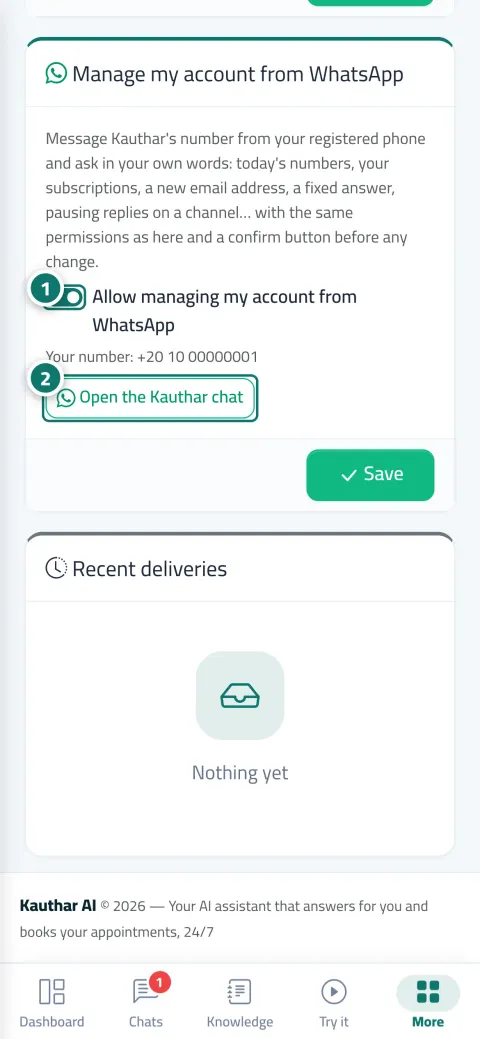
Make sure your number is verified in your account and “Allow managing my account from WhatsApp” is on.
Message Kauthar's official number from your phone; the main menu appears with ten sections.
Type your request or send a voice note, review the summary and click “Confirm”.
Step-by-step instructions with numbered screenshots in the user guide
Real examples
“Pause WhatsApp replies for an hour” during the rush, then “Resume replies” afterwards, and “Today's figures” before closing.
“Tomorrow's appointments” in the morning, “Move Sara's appointment to 3 PM” with confirmation, and a “A customer needs someone” alert the manager answers with “I'll reply”.
“When someone asks about shipping to Saudi Arabia, say 3 days” becomes a fixed answer after confirmation, and “Post on Facebook: weekend offer” becomes a text post.
FAQ
No. Every user sees and does only what their dashboard permissions allow, and if they ask for something outside them Kauthar tells them so.
Payments, deletions and cancellations, adding users or changing their permissions, and changing passwords and two-step verification; Kauthar sends you a link to the right page.
No. Kauthar warns you that she didn't save what you typed, and sets a strong password she generates with a link that opens once.
Kauthar asks you once which business to manage and remembers your choice, and “Switch account” changes it.
Kauthar's Egyptian number if your number is Egyptian, and the Saudi number otherwise; any unverified number talks to the regular sales and support assistant.

Your Kauthar account is free — no time limit, no credit card. Then turn on the services you need.
Explore the dashboard with a ready demo account
No credit card Pay only for the services you use Live in minutes