
The problem
A customer asked for a person an hour ago and nobody opened the screen
The alert exists in the system but nobody saw it, or the opposite: a sound for everything even in the middle of the night, so the team switches all notifications off.
Account & team
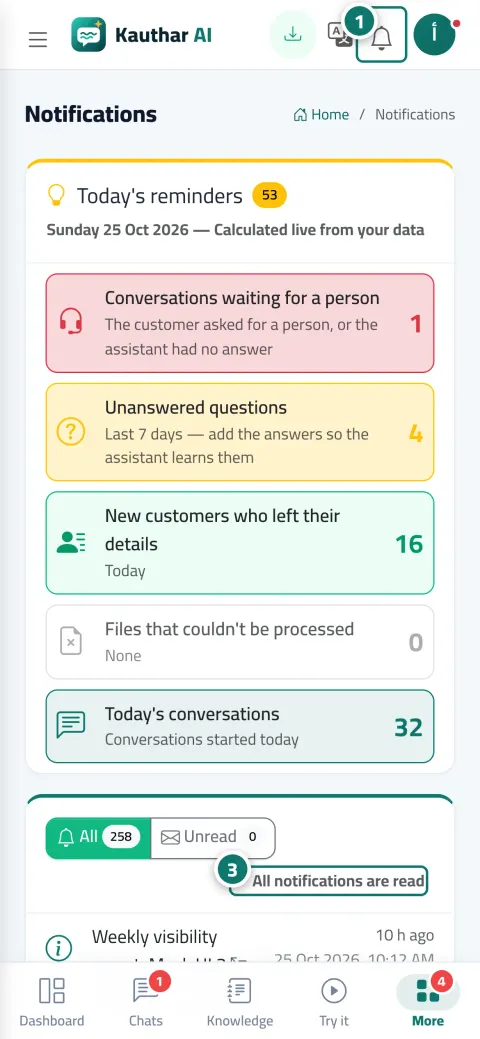
The bell shows the latest alerts, and “Today's reminders” gathers the conversations that need a person, unanswered questions and new customers. You turn on notifications on your phone and browser, and choose precisely what reaches you and when it goes quiet.
Just type your number — Kauthar messages you on WhatsApp and sets up your account with you.
Read the user guide Try Kauthar now
Your Kauthar account is free — no time limit, no credit card. Then turn on the services you need.

The problem
The alert exists in the system but nobody saw it, or the opposite: a sound for everything even in the middle of the night, so the team switches all notifications off.
The solution with Kauthar
“Enable notifications on this device” with steps for iPhone, Android and computer, “My devices” with a test notification per device, and an events table (conversations and customers, bookings and orders, tickets, content, account) with two switches per event — on my devices and backup email — plus “Quiet hours”.
What you gain
Conversations that need a person, unanswered questions from the last 7 days, new customers who left their details, files that couldn't be read, and today's conversations, in one card.
Tapping the notification opens the related screen, in the Kauthar app notifications arrive even with the app closed, and each device is enabled separately.
Personal settings per member that don't change what their colleagues receive, and a “Backup email” sent only if the notification doesn't reach any device within minutes.
Every alert arrives in its reader's language (Arabic, English or French), and alerts assigned to a person reach them alone.
Three steps
From the bell menu, click “Enable notifications on this device” and allow it.
From “Notifications & my devices”, send a test notification and choose what reaches you.
Set “Quiet hours” and “Backup email”, then follow “Today's reminders” every morning.
Step-by-step instructions with numbered screenshots in the user guide
Inside the product
Screenshots of a demo business; names and numbers are examples.


Real examples
A “New booking” notification on the doctor's phone only, a “Customer asked for a person” notification on the reception phone, and quiet hours after 10 PM.
A “New order from the chat” alert reaches the manager's phone instantly, and the other alerts fall back to the backup email when the phone is offline.
A “Ticket assigned to you” notification for each engineer on their device, and “The response deadline will be missed in 15 minutes” before a miss.
FAQ
One alert per conversation at its first unanswered question, so you can catch the customer without annoying repetition.
Allow it in your browser settings and try again, and in the phone app: device settings → Apps → Kauthar → Notifications.
Yes, after installing Kauthar on the home screen from the browser, or by using the Kauthar app.
That the latest delivery attempts to it failed (the app was removed or permission revoked). Delete it and enable notifications again on that device.
No, they stay on the page and you can mark them as read or “Mark all as read”.

Your Kauthar account is free — no time limit, no credit card. Then turn on the services you need.
Explore the dashboard with a ready demo account
No credit card Pay only for the services you use Live in minutes