Help desk

A reply promise that's kept, and customers know when

Urgent within 30 minutes, normal within 8 working hours. Every request gets its deadline when opened, the timer turns yellow then red, and the alert arrives 15 minutes before a miss. Whoever writes outside hours knows right away when they'll get a reply.

Read the user guide Try Kauthar now

Your Kauthar account is free — no time limit, no credit card. Then turn on the services you need.

The “Response times (SLA) based on working hours” screen in the Kauthar dashboard on a computer
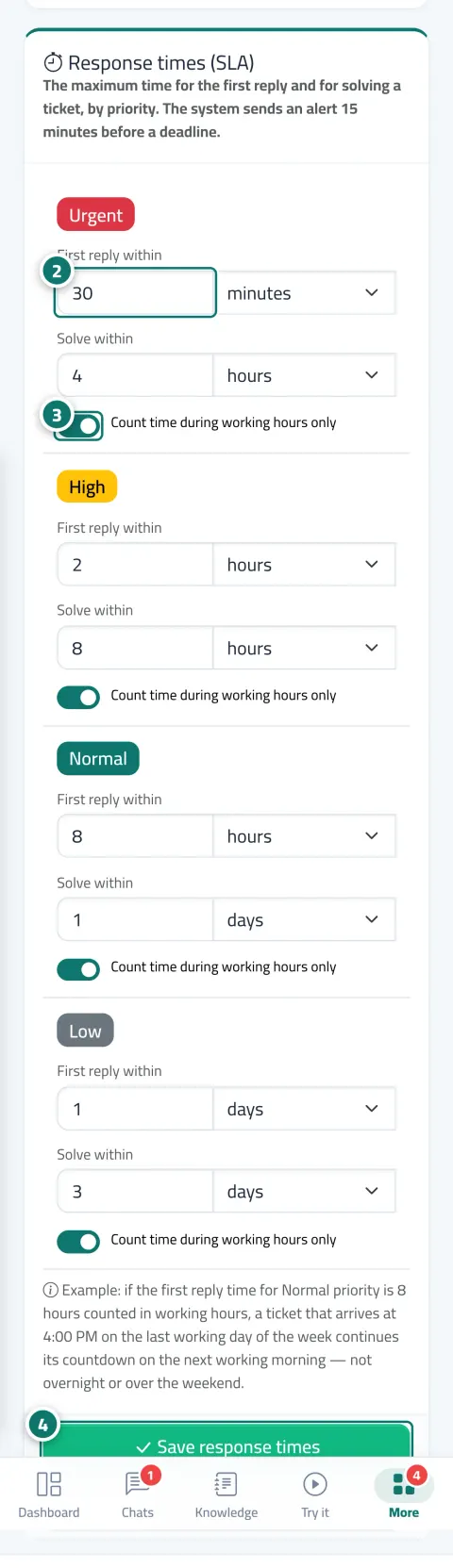
The “Response times (SLA) based on working hours” screen in Kauthar on a phone

The problem and the solution

The problem

“We'll get back to you soon” with no time, and tickets that run late without anyone knowing

Nobody is watching the requests open for three days, the deadline is counted over the weekend as if it were a working day, and the customer who wrote on Friday night thinks they've been ignored.

The solution with Kauthar

A deadline per priority, and a monitor that runs every minute

You set “First reply within” and “Resolve within” for each priority, and whether time counts during working hours only. The monitor flags the late ticket and alerts the owner or the whole team, and it appears in the “Past SLA” tab and on the dashboard.

What you gain

What your business gets

  • A deadline that respects your working hours

    For each day one or two shifts or a day off, and time outside them doesn't count toward the deadline. Default: Saturday to Thursday, 9:00 AM to 5:00 PM.

  • An alert before and after a miss

    15 minutes before: “The response deadline will be missed in 15 minutes” to the owner, or the team if unassigned; afterwards “First-reply deadline missed” or “Resolution deadline missed”, on the phone too.

  • Your customer knows the reply time

    Whoever opens a ticket or asks for a person outside hours sees “We received your message outside working hours and will reply from Saturday at 9:00 AM”, in their language, with the nearest real working time.

  • The AI assistant never stops

    Working hours apply to your team and tickets; Kauthar answers conversations 24 hours a day.

Three steps

How it works

  1. 01

    In “Helpdesk settings” → “Working hours”, set the working days and their shifts.

  2. 02

    In “Response times”, set first reply and resolution per priority and choose “During working hours only”.

  3. 03

    Follow the “Past SLA” tab and the alerts on your phone.

Step-by-step instructions with numbered screenshots in the user guide

Inside the product

Inside the dashboard

Screenshots of a demo business; names and numbers are examples.

The “Working hours and days off” screen in the Kauthar dashboard on a computer
Working hours and days off
The “Alerts before and after a missed deadline” screen in the Kauthar dashboard on a computer
Alerts before and after a missed deadline
The “Out-of-hours notice” screen in the Kauthar dashboard on a computer
Out-of-hours notice

Real examples

How your business uses it

  • Service company

    Urgent for a service outage: first reply within 30 minutes and resolution within 4 working hours; the monitor alerts the on-duty engineer 15 minutes before a miss.

  • Store

    Two shifts a day (morning and evening) with Friday off; a customer writing on Thursday night sees “We will reply from Saturday at 9:00 AM”.

  • Clinic

    A one-working-day resolution deadline for questions about results, and late tickets appear on the clinic manager's dashboard every morning.

FAQ

Frequently asked questions

What does “During working hours only” mean?

Time outside your working hours and on days off doesn't count toward the deadline; the hours are set in the “Working hours” tab in your business's time zone.

Who receives the alert?

The agent responsible for the ticket; if it isn't assigned to anyone, the whole team, and on the phone if notifications are turned on.

Does the deadline pause while the ticket waits for the customer's reply?

No, in the current version the clock keeps running on tickets that are “Waiting for the customer” and “On hold”.

Can I edit the out-of-hours message?

The text is fixed for now; only the reply time changes in it, and the customer sees it in their language (Arabic, English or French).

What are the default deadlines?

Urgent 30 minutes / 4 hours, high 2 hours / 8 hours, normal 8 hours / 1 day, low 1 day / 3 days. The number goes from 1 to 999, up to a maximum of 90 days.

Kauthar, the AI assistant

Start with a free account today

Your Kauthar account is free — no time limit, no credit card. Then turn on the services you need.

No credit card Pay only for the services you use Live in minutes