Help desk

Every request to the right specialist, every agent in turn

Sales, support, complaints and returns — departments with their agents, which the customer picks when opening a ticket, and every new ticket is assigned to the next agent in turn within its department with an instant alert. Duplicates are merged into one ticket.

Read the user guide Try Kauthar now

Your Kauthar account is free — no time limit, no credit card. Then turn on the services you need.

The “Support departments and agent allocation” screen in the Kauthar dashboard on a computer
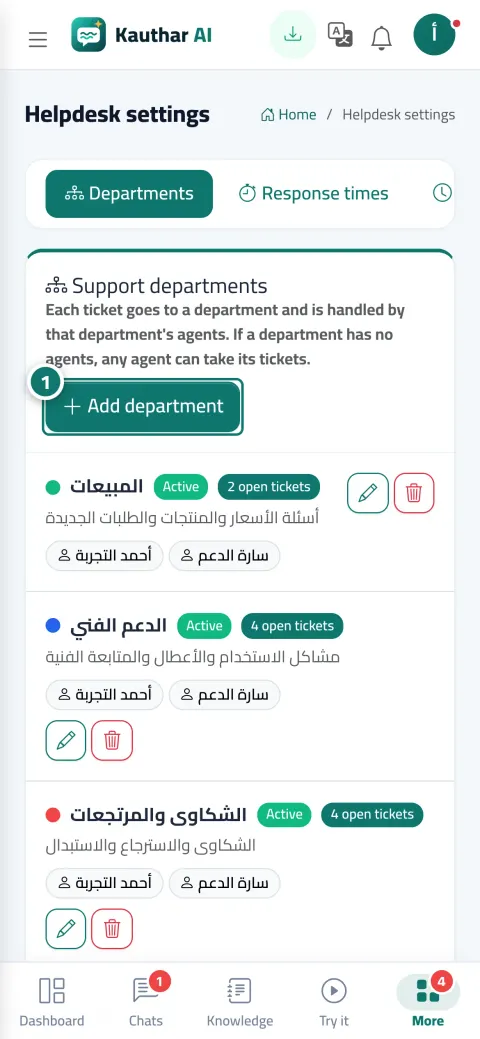
The “Support departments and agent allocation” screen in Kauthar on a phone

The problem and the solution

The problem

Tickets go to whoever opens the screen first, and the same problem is opened three times

One agent drowning in tickets and another with nothing to do, a shipping complaint landing in sales, and the same customer writing from the chat and by email so two tickets are opened with two different agents.

The solution with Kauthar

Departments, round-robin and merging

Each department has a name, description, colour and agents, and can be paused without deleting it. “Round robin within the department” assigns each new ticket to the next agent in turn, or “Manually” lets agents pick up tickets themselves. “Merge” moves the duplicate's messages into the main ticket and closes it with a clear badge.

What you gain

What your business gets

  • Three ready departments

    The first time you open the settings you find Sales, Support, and Complaints & returns; add your own, and an active department is shown to the customer on the ticket form.

  • Fair assignment with an alert

    Round-robin within the department, and the agent gets a “Ticket #… was assigned to you” alert in the bell and on their phone. A department with no agents has its tickets spread across everyone.

  • Merge duplicates

    All messages move to the main ticket and the duplicate is closed with a “Merged into ticket #…” badge, one at a time or in bulk for several tickets.

  • A ticket for whoever calls or walks in

    The agent opens a ticket themselves; Kauthar recognizes the customer by phone or email and shows their previous tickets, and records the channel (phone, WhatsApp, Facebook, visit) so it appears in the reports.

Three steps

How it works

  1. 01

    In “Helpdesk settings” → “Departments”, add your departments and set each one's agents.

  2. 02

    In “Routing & ratings”, choose “Round robin within the department” or “Manually”.

  3. 03

    Merge duplicate tickets from the bulk-actions bar, and open a ticket for any request that arrives outside the system.

Step-by-step instructions with numbered screenshots in the user guide

Inside the product

Inside the dashboard

Screenshots of a demo business; names and numbers are examples.

The “Round-robin ticket assignment” screen in the Kauthar dashboard on a computer
Round-robin ticket assignment
The “Merging duplicate tickets” screen in the Kauthar dashboard on a computer
Merging duplicate tickets
The “Opening a ticket on the customer's behalf” screen in the Kauthar dashboard on a computer
Opening a ticket on the customer's behalf

Real examples

How your business uses it

  • Service company

    A “Maintenance” department with three technicians in rotation, a “Billing” department with one agent, and the customer picks the department themselves when opening a ticket from the website.

  • Store

    The customer wrote about the same order from the chat and by email; the two tickets are merged into one and the customer sees every message in a single tracking portal.

  • Real-estate agency

    A call from a unit owner becomes a ticket in the “Owner services” department with the “Phone” channel, so it isn't forgotten and shows in the channel reports.

FAQ

Frequently asked questions

Can an agent be in more than one department?

Yes, select them in every department you want them in.

Does automatic assignment redistribute old tickets?

No, assignment happens when the ticket is created only. The default setting is “Round robin” from day one.

Can a merge be undone?

There's no undo button; if you merged by mistake, write an internal note in the main ticket and continue from there.

How many departments can I create?

Depending on the plan: up to 3 departments on Pro, unlimited on Business. Deleting a department doesn't affect its tickets, and it can be restored from the trash.

Does the customer know a ticket was opened on their behalf?

If you entered their email and support email is connected with acknowledgement turned on, they receive an email with the ticket number; in any case you can send the tracking link on WhatsApp.

Kauthar, the AI assistant

Start with a free account today

Your Kauthar account is free — no time limit, no credit card. Then turn on the services you need.

No credit card Pay only for the services you use Live in minutes