
The problem
One shared account, and a password everyone knows
You don't know who deleted the ticket or who changed the price in the fixed answer, an employee who left can still sign in, and another sees the subscription and invoices for no reason.
Account & team
The customer service agent answers conversations and tickets without deleting, the manager sees everything, and the accountant sees only the subscription. You add each member by phone number, they sign in themselves and set their password, and everything they do is recorded in the activity log.
Just type your number — Kauthar messages you on WhatsApp and sets up your account with you.
Read the user guide Try Kauthar now
Your Kauthar account is free — no time limit, no credit card. Then turn on the services you need.

The problem
You don't know who deleted the ticket or who changed the price in the fixed answer, an employee who left can still sign in, and another sees the subscription and invoices for no reason.
The solution with Kauthar
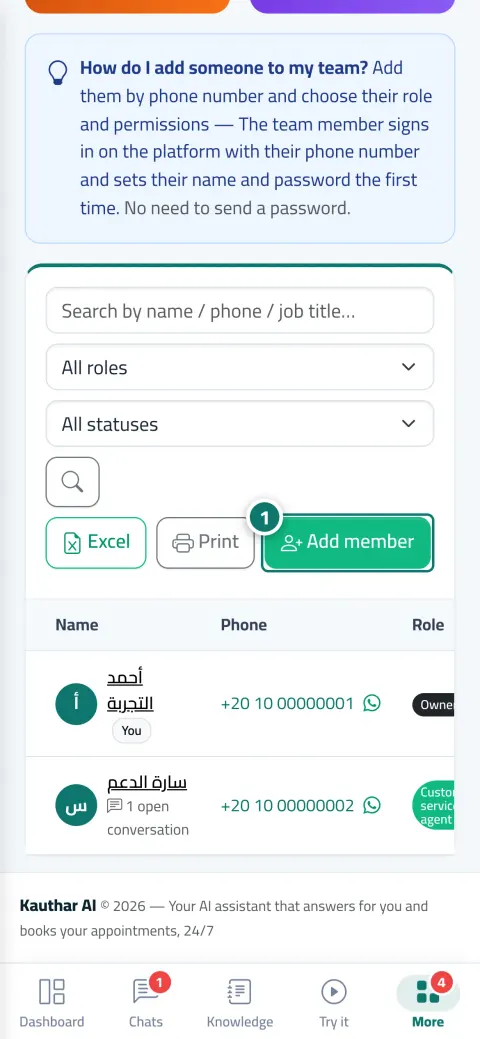
“Team & permissions”: name, number, role (manager, customer service agent, staff), title and colour, and a page per member with last sign-in and their replies. A permissions matrix per module with a “Quick fill” for “Customer service” or “Staff”, applied immediately without signing out.
What you gain
No password is sent: the employee signs in with their number and sets their name and password the first time, a WhatsApp button sends them the sign-in instructions, and “Suspend” signs them out of every device immediately.
View, add, edit and delete for every module: conversations, tickets, bookings, knowledge, posts, customers, reports, subscription and more, with a “Quick fill”.
Time, user, action, entity and device address, with filters and search, and opening any entry shows a “before / after” comparison of the change. Read-only and can't be edited.
Files, answers, conversations, tickets, departments and members go to the trash, and “Restore” brings them back as they were; “Delete permanently” is for the owner only.
Three steps
From “Team & permissions”, click “Add member”: number, name and role, and send them the sign-in instructions on WhatsApp.
Set their permissions in the matrix or use “Quick fill”.
Review the activity log when needed, and restore any deleted item from the trash.
Step-by-step instructions with numbered screenshots in the user guide
Inside the product
Screenshots of a demo business; names and numbers are examples.


Real examples
Three customer service agents with the “Customer service” quick fill, an accountant who sees “Settings & subscription” only, and the manager reviews the activity log every week.
The receptionist views, adds and edits bookings without deleting, and when she leaves her account is suspended immediately and her seat is freed.
“My accounts” brings the salon and the store together under one sign-in, the owner switches between them from the menu, and each business keeps its own data and team.
FAQ
Click “Suspend” on their page; they're signed out of every device immediately, their replies and log stay, and their seat is freed. You can “Delete” the account later and restore it from the trash.
They use “Forgot your password?” with their number on the sign-in screen, or you click “Reset password” on their page.
The number of users in your plan plus any extra users, and every active account counts, including the owner's.
No, they apply immediately from the next request.
No. Each business is completely separate with its own data, team and subscription; “My accounts” only saves you signing in again.
In the activity log, choose the action “Delete” and the entity “Ticket”; the name and time appear, and you restore it from the trash.

Your Kauthar account is free — no time limit, no credit card. Then turn on the services you need.
Explore the dashboard with a ready demo account
No credit card Pay only for the services you use Live in minutes