
The problem
WhatsApp messages never stop, and one number isn't enough
Dozens of messages a day on the sales number, another number for the branch, and an employee carrying two phones. In the evening the messages pile up until morning.
Channels & conversations
Connect your business number from Meta's window without copying a token or password, and Kauthar handles the registration, activation and connection test. She then answers your customers inside WhatsApp from your information, with buttons, lists and booking, and hands over to you when needed — from the same number the customer wrote to.
Just type your number — Kauthar messages you on WhatsApp and sets up your account with you.
Read the user guide Try Kauthar now
Your Kauthar account is free — no time limit, no credit card. Then turn on the services you need.

The problem
Dozens of messages a day on the sales number, another number for the branch, and an employee carrying two phones. In the evening the messages pile up until morning.
The solution with Kauthar
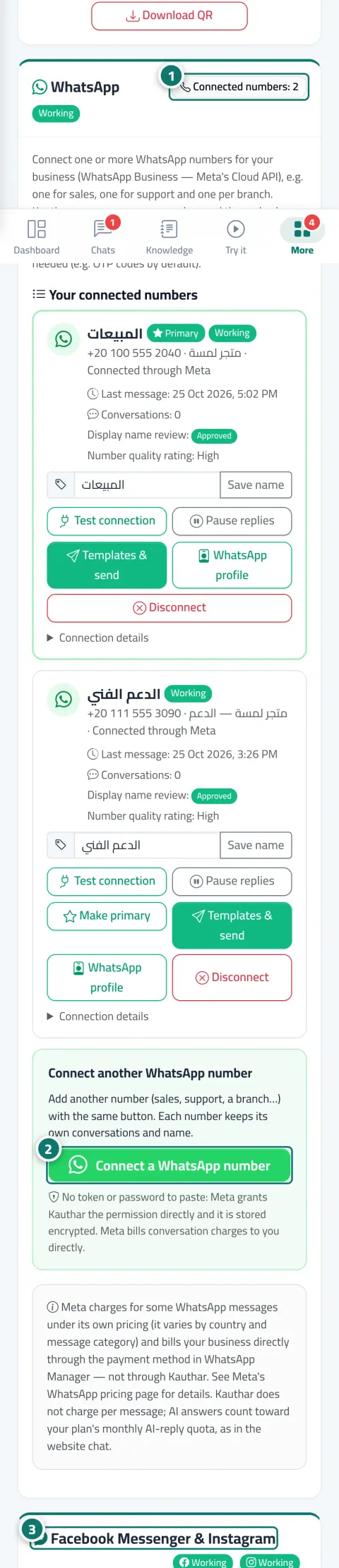
The “Connect a WhatsApp number” button opens Meta's window: you pick the account and number, Meta verifies it, and you come back to find the number marked “Working”. Name each number (sales, support, Jeddah branch), choose the primary one, and Kauthar replies from the same number the customer wrote to.
What you gain
Sign in with Facebook, choose the WhatsApp Business account and number, and grant Kauthar permission to reply on that number only. The permission is stored encrypted and you can revoke it at any time.
Connect more than one number depending on your plan, name each one, follow each number's status, last message, conversation count and quality rating, and filter conversations by number.
Replies from the knowledge base and fixed answers, reply paths as buttons and lists, appointment booking, handoff to your team, and product cards.
Create utility or marketing templates with variables and quick-reply buttons and send them for Meta's approval from inside Kauthar, to start a conversation after 24 hours or with a new customer.
Three steps
From “Channels” → the “WhatsApp” card, click “Connect a WhatsApp number” with a new number not registered on the app.
Complete Meta's window (sign-in, account, number, verification code) and come back to Kauthar to find the number “Working”.
Name the number and choose the primary one, and add more numbers from “Connect another WhatsApp number”.
Step-by-step instructions with numbered screenshots in the user guide
Inside the product
Screenshots of a demo business; names and numbers are examples.


5 parts of this feature
One line per part, as documented in the user guide. Open any title for the steps and the screenshots.
Kauthar answers your customers inside WhatsApp (one number or more), Messenger and Instagram, and on comments on your posts — connected in one click from the Channels page.
Connect your business WhatsApp number to Kauthar straight from Meta's window, without copying any token or password; Kauthar then registers the number, turns on incoming messages and tests the connection by itself.
Connect more than one WhatsApp number (for sales, support and each branch), name each number and choose the primary one; Kauthar always replies from the same number the customer wrote to.
Send a WhatsApp message from your business number to any number, and create message templates approved by Meta to start conversations after the 24-hour window.
Disconnect any WhatsApp number from Kauthar and choose to release it from Meta so you can use it again in the WhatsApp app on your phone; your other numbers and their conversations stay as they are.
Real examples
One number for sales and one for support; a customer asks about a product and Kauthar shows its card and buy button, asks about their order and she answers from the shipping file, and every reply goes out from the number they wrote to.
Kauthar answers “Is there an appointment tomorrow?” with the booking steps inside WhatsApp, and after confirmation the booking number and change link reach the patient on the same WhatsApp.
A named number per branch, replies from the same number, and the conversation report shows “WhatsApp by number” so you know which branch gets the most messages.
FAQ
No. The “Connect a WhatsApp number” button uses the Kauthar app, Meta grants Kauthar permission on your number only, and you can revoke it at any time.
Use the “Connect the WhatsApp Business app on your phone” button: the app keeps working as it is and the messages also reach Kauthar. The green button is for a new number not registered on WhatsApp.
Meta charges fees on some messages depending on the country and message type, and collects them from your business directly through WhatsApp Manager, not through Kauthar. AI replies count against your plan's allowance.
Free-form replies are allowed within 24 hours of the customer's last message; after that, the conversation starts with a Meta-approved template message, which you create from inside Kauthar.
No, never. She replies from your number only, and Kauthar's numbers are never used for verification codes or follow-ups on behalf of your business.
Yes, you can pause replies on any number, or on Facebook or Instagram, each separately, without disconnecting.

Your Kauthar account is free — no time limit, no credit card. Then turn on the services you need.
Explore the dashboard with a ready demo account
No credit card Pay only for the services you use Live in minutes