
The problem
Forgotten passwords and shared accounts
An employee uses a colleague's account because they forgot their own, the owner has no idea who signed in and when, and bots hammer a login page protected by nothing but a password.
Account and security
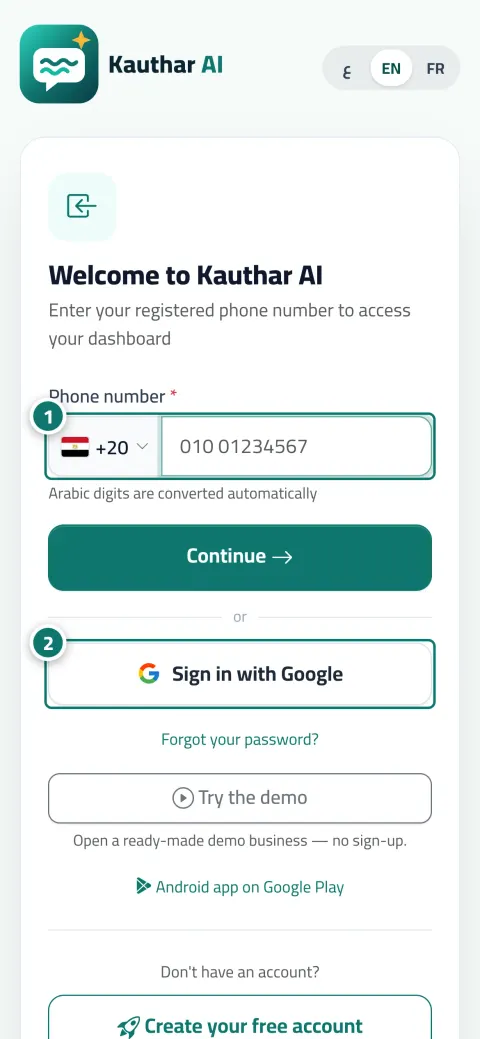
Every member signs in with their phone number and a password, or in one click through a linked Google account, and stays signed in on their device for up to ninety days. Forgot the password? They recover it themselves with a WhatsApp code. The business owner alone holds the business details, the currency and the decision to delete.
Just type your number — Kauthar messages you on WhatsApp and sets up your account with you.
Read the user guide Try Kauthar now
Your Kauthar account is free — no time limit, no credit card. Then turn on the services you need.

The problem
An employee uses a colleague's account because they forgot their own, the owner has no idea who signed in and when, and bots hammer a login page protected by nothing but a password.
The solution with Kauthar
Each member has their own number and password, or their own Google account. The check that a real person is signing in happens in the background in an instant, and repeated wrong attempts lock temporarily. Disabling a member ends their sessions on every device at once, and a reset gets them back in within a minute.
What you gain
Country and phone number, then the password, and the session stays on the device for up to ninety days, renewing with use. The interface comes in Arabic, English and French.
Link your Google account once from My account, then sign in with one click and no password, and use it to finish registration if the code cannot reach you.
Forgot password?, then your number, a six-digit code on WhatsApp or SMS that fills itself in, then a new password. No ticket, no waiting.
An automatic check that a real person is signing in, usually with no pictures or puzzles, a temporary lock after repeated wrong passwords, and an instant sign-out on every device when a member is disabled.
Three steps
Register your business with your phone number and a WhatsApp code, and set the business details: name, phone, country, currency and time zone.
Add your team by their numbers; each member activates their own account at first sign-in with their name and password, and links Google if they wish.
Each member edits their name, email and password from My account; you manage numbers and permissions from Team.
Step-by-step instructions with numbered screenshots in the user guide
Inside the product
Screenshots of a demo business; names and numbers are examples.


7 parts of this feature
One line per part, as documented in the user guide. Open any title for the steps and the screenshots.
Sign in with your phone number (with country code) and password, or with your linked Google account, and you won't need to sign in again on the same device for up to 90 days.
Sign in to Kauthar with one tap using the Google account linked to your account, and use it to recover your account if the code message doesn't arrive.
Recover your account yourself: phone number → verification code on WhatsApp or by SMS → a new password — or sign in with your linked Google account.
Every member edits their own name, job title and email, changes their own password, can delete their account, and stays signed in on their device.
Your business name, phone, email and address, plus its country, price currency and time zone in one place; they are used on your screens, the chat page, bookings and printouts.
The sign-in and sign-up pages are protected from bots by an automatic check that runs in the background in a moment, usually without pictures or puzzles.
The owner deletes the business with all its data, with 14 days to change their mind; a team member deletes only their own account; and anyone who can't sign in has a public deletion request page.
Real examples
A new employee every month: added by number, activates their own account, and when they leave they are disabled and signed out of every device immediately.
The receptionist signs in once on the clinic computer and stays signed in all month, while the doctor signs in from their phone with Google in one click.
Setting the currency and time zone once makes prices in replies, booking slots and reminders right for every customer, with no manual work.
FAQ
No. The phone number is the login. Email is optional for notifications and receipts, and a Google account is optional for one-click sign-in.
The code is also sent by SMS, and if your account is linked to Google you sign in with it directly and change the password from My account.
Their sessions end on every device immediately, and what they did stays in the activity log. Re-enabling brings them back in an instant.
Yes, by the business owner only, with a page that lists what will be deleted and a fourteen-day grace period to cancel by signing in with the owner's number.
Nothing. Customer pages (chat, booking, tickets) require no sign-in and no security check; the protection is on the control panel only.
Inside the Kauthar mobile app you sign in with your number and password; the Google button is available in the browser.

Your Kauthar account is free — no time limit, no credit card. Then turn on the services you need.
Explore the dashboard with a ready demo account
No credit card Pay only for the services you use Live in minutes