
The problem
The subscription expired and customers are writing to nobody
Nobody noticed the end date, paying needs a transfer, a chat and a proof, and the accountant asks for the receipt of a payment made six months ago that nobody can find.
Billing and subscriptions
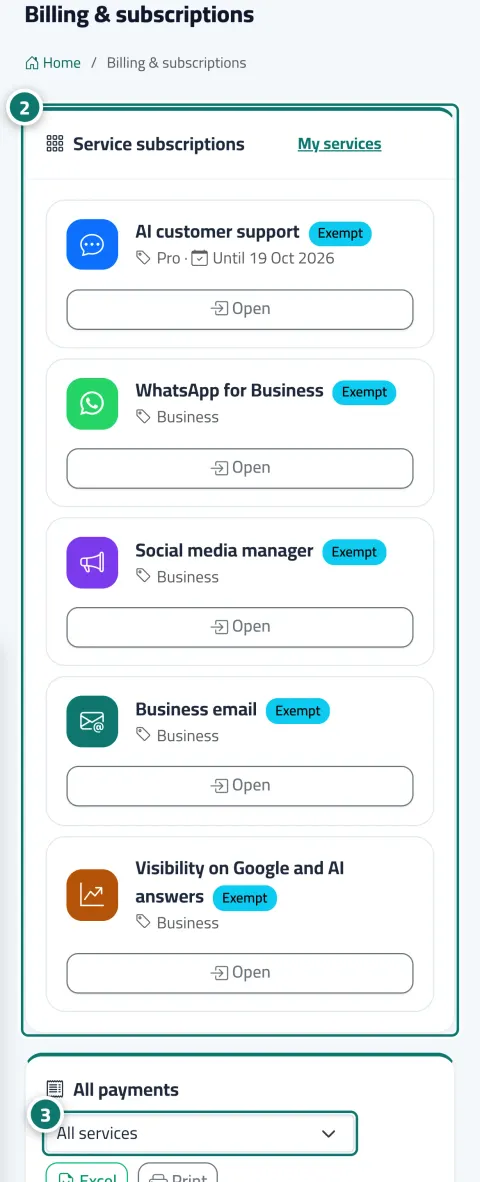
Every service has its own subscription and page, and the billing page gathers them all: each service's status and end date, and every payment with its receipt. Online payment activates the subscription the moment it is confirmed, and reminders reach you before expiry inside Kauthar, by email and on WhatsApp with a payment link that needs no sign-in.
Just type your number — Kauthar messages you on WhatsApp and sets up your account with you.
Read the user guide Try Kauthar now
Your Kauthar account is free — no time limit, no credit card. Then turn on the services you need.

The problem
Nobody noticed the end date, paying needs a transfer, a chat and a proof, and the accountant asks for the receipt of a payment made six months ago that nobody can find.
The solution with Kauthar
Pick the plan and term and the order summary shows the lines, the total and the start date, then a secure payment page with cards and wallets, or your Shopify invoice if your store is connected to it. The subscription activates instantly with an A4 receipt. A week, a day and the day before expiry you get reminders with a direct payment link, and if a service ends only its pages stop while your account and data remain.
What you gain
Bank cards and e-wallets in your local currency, and the subscription starts the moment payment is confirmed, with a success message and the receipt button, waiting for nobody.
A full payment history with operation, plan, term and status, an A4 receipt stamped Paid for every completed payment, and an Excel export for the accountant.
Before any service or trial ends: a notification in Kauthar, an email and a WhatsApp message from Kauthar's official number, with a link that renews without signing in.
Each service has its own term. When one ends only its pages stop; the account, the team, the other services and your data stay as they are until you renew.
Three steps
From My services open the service card then Subscription, pick the plan and term and the order summary updates instantly.
Press Pay now and complete the payment on the secure page, or approve the amount in Shopify if your store is connected to it.
Follow every subscription and payment from Billing and subscriptions, and print or export the receipts when needed.
Step-by-step instructions with numbered screenshots in the user guide
Inside the product
Screenshots of a demo business; names and numbers are examples.


11 parts of this feature
One line per part, as documented in the user guide. Open any title for the steps and the screenshots.
One page with the subscription status of every service and all your payments with receipts, ready to print or export to Excel.
Every service has its own subscription page: plans and limits, the duration (monthly or 3, 6 or 12 months), the launch price on the first subscription, add-ons, the order summary and payment, and the service's payment history.
Pay for or renew your subscription online by bank card or e-wallet; it activates as soon as the payment is confirmed, with a receipt.
A complete history of your subscription payments, with a printable receipt for every payment (showing the equivalent in your currency where relevant) and an Excel export of the history.
Before the trial or subscription of any service ends, Kauthar reminds you in the dashboard, by email and on WhatsApp from its official number — with a direct pay link that renews without signing in.
If your business is connected through the Kauthar app on Shopify, every Kauthar subscription is added to your Shopify invoice, and you approve the amount on Shopify's official page.
The «Subscription» page for the «AI customer support» service: your plan, its end date and your usage, plus renewing, changing plan and paying online in minutes.
Every service has an introduction page inside your account: what it offers, the length and limits of its free trial, its plans and prices, and the “Start free trial” and “Subscribe” buttons.
At the top of the sidebar a switcher lists your active services; choose one and the menu shows only that service's pages, and the phone's bottom bar changes with it.
A countdown bar shown to the owner and admins before the «AI customer support» subscription or free trial ends; after it ends, only this service's pages stop.
When a service's subscription or trial ends, only that service's pages stop; the account, your other services, your team and your settings keep working, and your data is kept until you renew.
Real examples
The Kauthar subscription is added to the same monthly Shopify invoice, so no new card and no third party in the store's books.
AI support, business email and social media on different terms, and the billing page shows what ends first so the manager renews only what is needed.
The owner gets a WhatsApp message a week before expiry with a payment link and pays from her phone in a minute without opening the control panel.
FAQ
No. Only that service's pages stop, the owner and admins see a renewal bar, everything else keeps working and your data stays stored.
Bank cards and e-wallets as offered by the payment gateway in your country, and through the Shopify invoice for stores connected to the Kauthar app there.
A set number of days before expiry, the day before, on the day, and on the last day of the grace period, once each, in Kauthar, by email and on WhatsApp to a verified number.
The receipt is issued electronically by the Kauthar platform with a receipt number, business details, line items, payment method and transaction number, and states the amount actually charged.
Subscription management and payment are done in the browser on any device. The mobile app is for the daily work.
The payment shows as Pending until the gateway confirms it, and the subscription activates automatically on confirmation. If anything is stuck, support takes over from the chat.

Your Kauthar account is free — no time limit, no credit card. Then turn on the services you need.
Explore the dashboard with a ready demo account
No credit card Pay only for the services you use Live in minutes