
The problem
Dollar prices and surprises at checkout
You pick a plan and discover the feature you need sits in another one, that the dollar price moves with every conversion, and that upgrading means paying twice for the same month.
Plans and pricing
Every Kauthar service has its own plans and terms, and prices show in your local currency before you register. Start monthly or take the launch price on your first longer subscription, compute your whole subscription in the calculator, and move up a plan any time with what you paid and did not use deducted.
Just type your number — Kauthar messages you on WhatsApp and sets up your account with you.
Read the user guide Try Kauthar now
Your Kauthar account is free — no time limit, no credit card. Then turn on the services you need.

The problem
You pick a plan and discover the feature you need sits in another one, that the dollar price moves with every conversion, and that upgrading means paying twice for the same month.
The solution with Kauthar
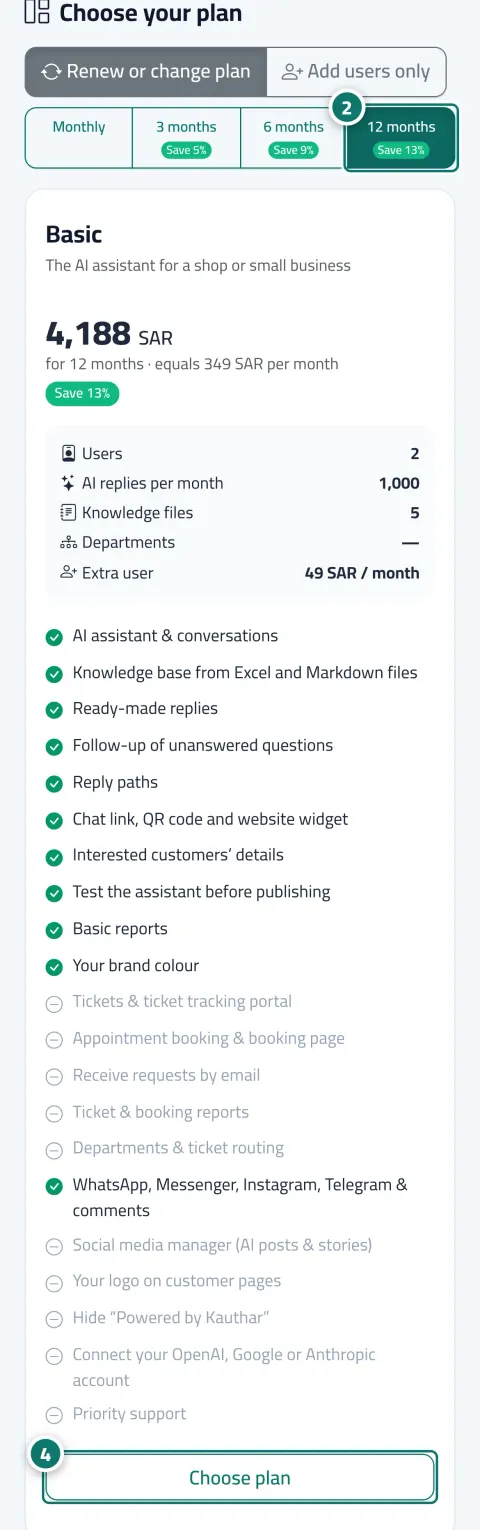
Basic for the AI assistant in a small business, Professional adding tickets, bookings and support email, Enterprise for large support teams. Pick the term and the price updates instantly in your currency, add users or extra replies only when needed, and know before paying the amount that will actually be charged.
What you gain
A price list per country shown on the website and the subscription page, and the order summary states the actual amount that will be charged to your card.
Monthly at the regular price, and the first paid subscription to any service for three months or more at the launch price where available, with a clear line stating the renewal price.
Choose your country, term, services, plans and expected usage; the calculator shows the total and adds the necessary extras automatically if your usage exceeds the plan's allowance.
Move up a plan at any time; the value of the paid days left is deducted automatically from the new price and shows as a line in the order summary.
Three steps
Open the pricing page or the calculator on the website and pick your country to see prices in your currency.
Start with the free trial from your account, then pick the plan and term on the service's subscription page when you decide.
Add users or extra replies only when needed, and upgrade whenever you like with the credit applied.
Step-by-step instructions with numbered screenshots in the user guide
Inside the product
Screenshots of a demo business; names and numbers are examples.


6 parts of this feature
One line per part, as documented in the user guide. Open any title for the steps and the screenshots.
Three plans for the «AI customer support» service (Basic, Pro, Business), monthly or for 3, 6 or 12 months, with optional add-ons; prices are shown in your country's currency. Every other service has its own plans on its subscription page.
Subscribe monthly at the regular price, or get the “Launch price” on your first paid subscription to any service for 3, 6 or 12 months — it renews at the regular price.
Pick your country, term, services, plans and expected usage, and the page computes the exact total in your currency, adding the needed add-ons automatically when your usage exceeds the plan allowance.
A clear monthly allowance of AI replies, with alerts at 80% and 100%, an automatic reset at the start of each month, and extra reply packs when you need them.
Add team members beyond your plan's users at any time, and pay only until your current subscription ends.
Move to a higher plan at any time; the value of the paid days left on your current subscription is deducted from the price automatically.
Real examples
Starts on Basic monthly; when demand grows it takes Professional for twelve months at the launch price and gets the remaining days credited.
Computes AI support with business email and social media for ten users in the calculator and knows the yearly figure before the budget meeting.
Subscribes to Professional for tickets and bookings, and adds a single user for a new doctor until the end of the current subscription only.
FAQ
Yes. The account has no expiry, and every service has a free trial started from inside the account with no card. You pay only for the service you decide to keep.
Monthly is the regular price and can be cancelled any time. The launch price applies to the first paid subscription of three months or more, then renews at the regular price stated under it.
You are notified at eighty percent and when it runs out. Fixed answers, buttons and handoff to a human keep working, and you buy an extra reply pack or wait for the first of the month.
A downgrade is scheduled for the start of the next term; during a paid term you stay on your plan until it ends.
The business owner or an admin only. Other members see the plans for information.
Each country has a price list in its currency. Pick your country on the pricing page or the calculator to see what applies to you.

Your Kauthar account is free — no time limit, no credit card. Then turn on the services you need.
Explore the dashboard with a ready demo account
No credit card Pay only for the services you use Live in minutes