Business email

An email address in your business's name, not a free one

info@your-business builds trust that free email never will. Add the domain, copy the ready records into your domain panel, click “Verify”, and create mailboxes for your team in minutes — and read them on your phone, computer or browser.

Read the user guide Try Kauthar now

Your Kauthar account is free — no time limit, no credit card. Then turn on the services you need.

The “Business email: mailboxes on your domain and a unified inbox” screen in the Kauthar dashboard on a computer
The “Business email: mailboxes on your domain and a unified inbox” screen in Kauthar on a phone

The problem and the solution

The problem

Free email on the business card, and an employee who left with the mailbox password

An address that doesn't carry your business's name, messages that land in spam, a mailbox and its history that leave with a departing employee, and setting up email on your domain needs a technician.

The solution with Kauthar

Your domain, your mailboxes, hosted by Kauthar

“Which option suits you?” — a new address on your domain here, or connect your existing email from “Mail”. After adding the domain, Kauthar shows the ownership, MX, SPF and DKIM records, and email is only activated after a live check of the records. Then mailboxes with an address, display name and a strong password shown once.

What you gain

What your business gets

  • Records ready to copy

    Ownership proof, MX, SPF, DKIM and suggested records, copied into your domain panel in about 15 minutes, with a “Verify” button that checks them live.

  • Mailboxes for your team

    An address, a display name and a strong password shown once or sent to an email you choose, storage and status tracking for each mailbox, and a one-click password reset.

  • Aliases and forwarding

    support@ and help@ reach the same mailbox, forwarding between your business's mailboxes, and deletion with a 14-day grace period during which the mail is kept.

  • On your phone, computer and browser

    Instructions for setting up email on your phone and computer, “Webmail”, and connecting the mailboxes to your team's unified inbox in Kauthar.

Three steps

How it works

  1. 01

    Open “Email on your domain” and add your business domain.

  2. 02

    Copy the records into your domain panel and click “Verify”.

  3. 03

    Create the mailboxes for your team, and add aliases and forwarding.

Step-by-step instructions with numbered screenshots in the user guide

Inside the product

Inside the dashboard

Screenshots of a demo business; names and numbers are examples.

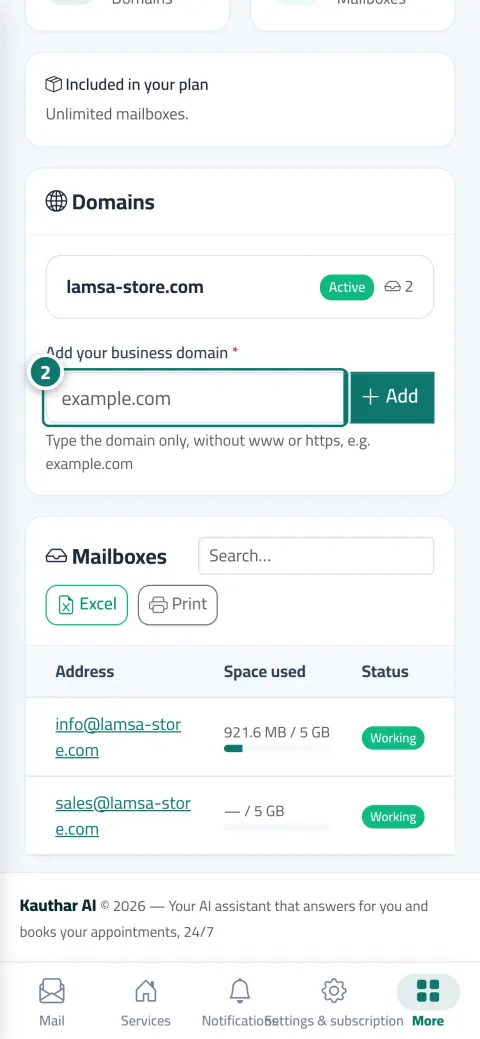
The “Email on your domain: the domain and mailboxes” screen in the Kauthar dashboard on a computer
Email on your domain: the domain and mailboxes

Real examples

How your business uses it

  • Service company

    info@ for enquiries, billing@ for invoices and a mailbox per engineer; when an employee leaves, the password is reset and the mail history stays.

  • Real-estate agency

    sales@ on the agency's domain in every ad, with the display name “Agency Sales”, and the reply reaches the customer from an address carrying the agency's name.

  • Training centre

    admissions@ with automatic forwarding to the manager's mailbox, and email set up on the admissions team's phones from the page's instructions.

FAQ

Frequently asked questions

Do I need to buy the domain from Kauthar?

No; you register and pay for the domain with a registrar, and Kauthar hosts the email on it.

I forgot a mailbox password — what do I do?

Open the mailbox from the table and choose reset password; a new password is shown once.

How many mailboxes can I create?

Depending on your plan (“Included in your plan”), and you can increase the number from the business email subscription page. AI customer-support plans include a number of mailboxes, so the service shows as “Included in your plan”.

Can I forward to an email outside my business?

No, forwarding is available between your business's mailboxes only.

What happens when I delete a mailbox?

A 14-day grace period during which sign-in stops and the mail is kept, then it's archived.

Kauthar, the AI assistant

Start with a free account today

Your Kauthar account is free — no time limit, no credit card. Then turn on the services you need.

No credit card Pay only for the services you use Live in minutes