
The problem
A shared mailbox where nobody knows who replied to what
A customer's email is read and never answered because everyone assumed someone else would, a long exchange scattered across threads, and no deadline, no owner and no report.
Help desk
Connect your support mailbox once. It's checked every minute, every new email creates a ticket with the customer's name and address, and the customer's reply to the same email is added to the same ticket. Your reply from the tickets screen reaches them from your own address.
Just type your number — Kauthar messages you on WhatsApp and sets up your account with you.
Read the user guide Try Kauthar now
Your Kauthar account is free — no time limit, no credit card. Then turn on the services you need.

The problem
A customer's email is read and never answered because everyone assumed someone else would, a long exchange scattered across threads, and no deadline, no owner and no report.
The solution with Kauthar
A ticket for every email with the deadline, automatic assignment and the default department you choose, and the ticket number in the subject [#12] links the customer's replies to it. Your reply carries your business's brand identity and the customer's language, with the tracking portal link, plus an optional acknowledgement email.
What you gain
Gmail, Outlook / Office 365, a mailbox hosted with us, or any server with manual settings; the password is stored encrypted and never shown again.
The customer's reply to the same email is added to the same ticket as long as its number is in the subject, and no duplicate tickets are opened. Auto-replies and newsletters are ignored.
It reaches the customer from the same address they wrote to, in your business's colour and logo and their language, with the ticket tracking portal link and attachments.
Turn on the acknowledgement email so the customer knows their email became a numbered ticket, with the expected reply time if they wrote outside working hours.
Three steps
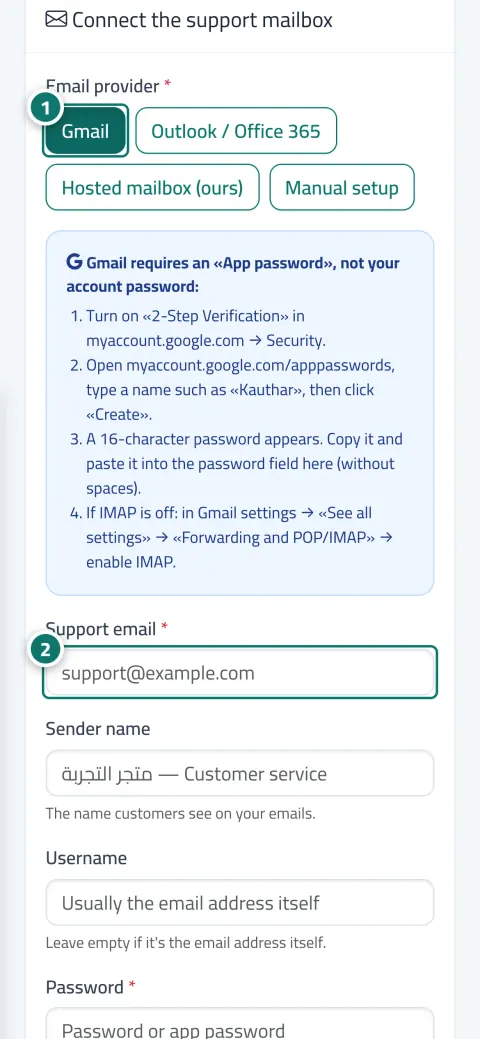
From “Helpdesk settings” → “Support email”, choose Gmail, Outlook or manual settings.
Enter an app password (with two-step verification) and choose the default department and acknowledgement.
Watch for new tickets; the mailbox is checked every minute automatically.
Step-by-step instructions with numbered screenshots in the user guide
Real examples
support@ for a maintenance company: every email is a ticket in the maintenance department, assigned round-robin to the technicians, with the attachments (photos of the fault) inside the ticket.
Return emails from the online store become tickets with a deadline, and the agent's reply reaches the customer with the store's logo and a link to follow the resolution.
Admission enquiries by email go automatically to the “Admissions” department, and the customer replies to the same email so everything stays in one ticket.
FAQ
Because Gmail requires an “app password”, not your account password: turn on two-step verification, create an app password and paste it without spaces, and make sure IMAP is enabled.
No, as long as the ticket number is in the subject (such as [#12]) the reply is added to the same ticket.
One mailbox per business in the current version, available on the Pro and Business plans.
It's stored encrypted and never shown again; if you leave the field empty when editing, it stays as it is.
Support email turns emails into tickets in the help desk. “Business email” is a separate service with mailboxes on your domain and a unified inbox for your team.

Your Kauthar account is free — no time limit, no credit card. Then turn on the services you need.
Explore the dashboard with a ready demo account
No credit card Pay only for the services you use Live in minutes