
The problem
Anonymous conversations you can't attribute or measure
A customer asked about a price and left without you knowing who they were, long conversations you can't tell were useful, and a generic page that doesn't look like your business.
Channels & conversations
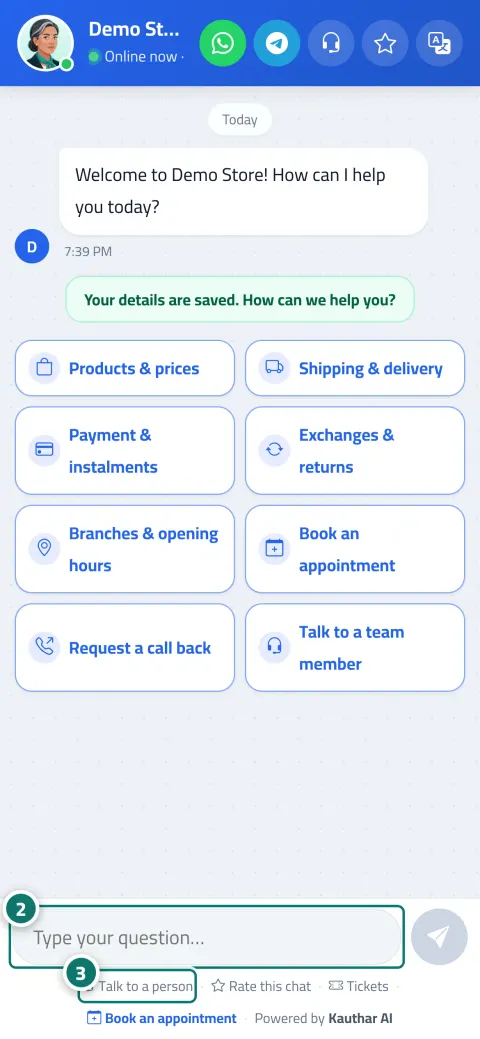
An elegant page with your business name, colour and logo, shown in the customer's device language, where they watch Kauthar's reply being typed word by word. Before the first message they enter their name and number once, so you always know who you're talking to.
Just type your number — Kauthar messages you on WhatsApp and sets up your account with you.
Read the user guide Try Kauthar now
Your Kauthar account is free — no time limit, no credit card. Then turn on the services you need.

The problem
A customer asked about a price and left without you knowing who they were, long conversations you can't tell were useful, and a generic page that doesn't look like your business.
The solution with Kauthar
A “Register to start” card before the first message (name and phone number, optionally occupation), sessions with a set length that start a new conversation under the customer's name after a pause, and a star rating plus “Helpful / Not helpful” under every answer.
What you gain
Your colour, name and logo, the assistant's name and picture with “Online now”, and icons for talking to a person, rating, language, and a WhatsApp button if you added a number.
Registration before the chat can't be skipped (it's enforced server-side), and numbers are saved in a unified international format so the call and WhatsApp buttons in Conversations work right away.
Five stars for the conversation, shown automatically after the fourth question, plus “Helpful / Not helpful” under every reply, with the results in Conversations, the dashboard and reports.
It's saved on the customer's device; if they come back within the session length they continue where they left off, and after that a new conversation starts with their details pre-filled.
Three steps
Set your brand identity, the assistant's name and the welcome message.
Leave “Ask for customer details before the chat starts” on and choose the session length that suits your business.
Share the link, the code or the widget, and review each session's details in Conversations and Customers.
Step-by-step instructions with numbered screenshots in the user guide
Inside the product
Screenshots of a demo business; names and numbers are examples.


Real examples
The customer registers their name and number, asks about a product and rates the answer; the next day they open the link and a new conversation starts under their name without re-entering their details.
A longer session (one hour) for patients who ask several questions in a row, and a “Contact us on WhatsApp” button with the reception number at the top of the chat.
Asking for “Occupation or business” at registration tells an individual customer from a company, and it shows in the customer profile for the sales team to follow up.
FAQ
No. Even if someone tries to send a message in an unusual way, the system rejects it and asks them to register first, because the check happens server-side, not just in the browser.
Because the session length ended, so a new conversation starts under their name with the correct time, after confirming their pre-filled details. You choose the length, from 5 minutes to 24 hours.
Yes, on the Business plan it disappears automatically from the chat page, the website widget, the ticket and booking pages and the poster.
No, it's optional and the card has a “Not now” button; they can change their rating later by tapping “Rate the conversation”.
The form disappears and the chat works directly, the “Leave your details and we'll contact you” card still appears when needed, and the new session after a pause keeps working quietly.

Your Kauthar account is free — no time limit, no credit card. Then turn on the services you need.
Explore the dashboard with a ready demo account
No credit card Pay only for the services you use Live in minutes