
The problem
A channel your customers prefer, and nobody to answer it
A Telegram bot needs a developer, a server and maintenance, so you leave the channel closed or hand it to an employee who answers from their phone between tasks.
Channels & conversations
For customers who prefer Telegram: create a bot in your business's name with @BotFather, paste its token into Kauthar, and she answers them from your information with buttons, product cards and booking — and your team replies from Conversations at any time, with no 24-hour window.
Just type your number — Kauthar messages you on WhatsApp and sets up your account with you.
Read the user guide Try Kauthar now
Your Kauthar account is free — no time limit, no credit card. Then turn on the services you need.

The problem
A Telegram bot needs a developer, a server and maintenance, so you leave the channel closed or hand it to an employee who answers from their phone between tasks.
The solution with Kauthar
Kauthar sets the bot's /start command and a description in your business's name, and answers whoever messages it as on your site: fixed answers and AI from the knowledge base, buttons, product cards with a buy button, booking, and handoff to your team.
What you gain
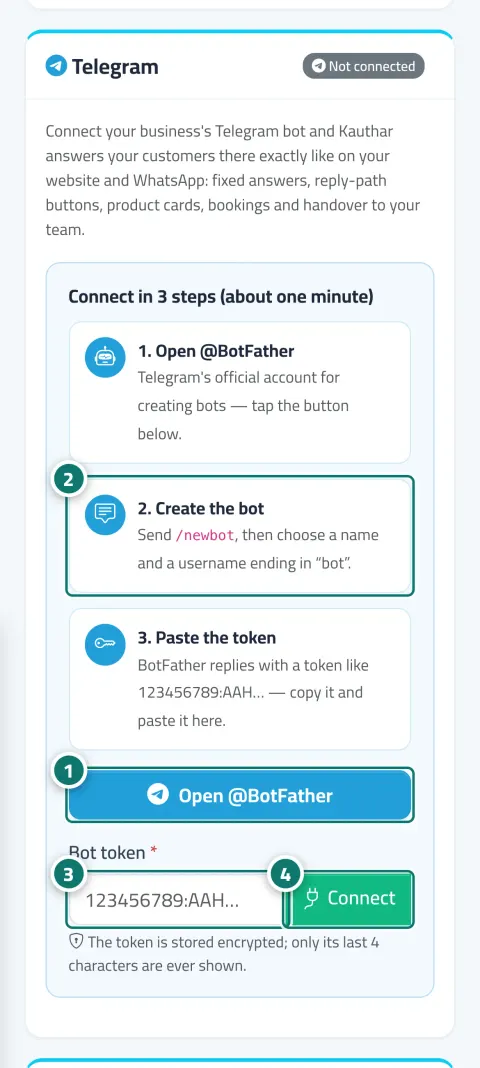
Open @BotFather, create the bot with /newbot, paste the token into the “Bot token” field and click “Connect”. The token is stored encrypted and only its last 4 characters are shown.
Replies from your information, reply-path buttons, product cards, appointment booking, handoff to your team, and the conversations appear in Conversations with the “Telegram” badge.
With Telegram Premium, link the bot to your account from Telegram Business, and Kauthar replies in your name to people who message you directly, while you can still reply yourself from the app.
Telegram imposes no reply window, so your team can reply to the customer from Conversations at any time, and a “Contact us on Telegram” button appears on the chat and booking pages.
Three steps
In the “Telegram” card, click “Open @BotFather”, send /newbot and choose a name and a username ending in bot.
Copy the token BotFather sends, paste it into “Bot token” and click “Connect”.
Send a message to the bot to test it, and manage it from the card: test connection, pause, disconnect.
Step-by-step instructions with numbered screenshots in the user guide
Inside the product
Screenshots of a demo business; names and numbers are examples.

Real examples
Customers who prefer Telegram ask about products and get cards with a buy button, and whoever shares their number is saved in “Customers”.
The students' Telegram channel points questions to the bot, which answers from the courses file and books seats, and the trainer replies from Conversations whenever they like.
The manager links the bot to their personal account through Telegram Business, so Kauthar replies in their name to customers who message them directly, and they step in when needed.
FAQ
Copy it again from @BotFather (/mybots → the bot → API Token) and paste it in full without spaces. If another service is reading the bot's messages, remove it and click “Test connection”.
One bot per business, and a bot connected to another Kauthar account can't be connected. You can change the token to use a different bot.
Only Kauthar's replies stop; the bot itself stays in your Telegram account.
A Telegram Premium subscription on your account, then in the Telegram app: Telegram Business → Chatbots → your bot's username → turn on “Reply to messages”.
Yes, they message the bot from the Telegram app. If the customer blocks the bot, messages won't reach them until they message it again.

Your Kauthar account is free — no time limit, no credit card. Then turn on the services you need.
Explore the dashboard with a ready demo account
No credit card Pay only for the services you use Live in minutes