
The problem
Visitors leave your site with a question nobody answered
The “Contact us” form is rarely filled in, nobody calls the phone number in the evening, and a visitor who can't find a quick answer closes the page and buys from another site.
Channels & conversations
A visitor browsing a product page at midnight with one question. A small button in the corner opens a chat inside the same page, Kauthar answers from your information in their language — and you get the link of the page they were on.
Just type your number — Kauthar messages you on WhatsApp and sets up your account with you.
Read the user guide Try Kauthar now
Your Kauthar account is free — no time limit, no credit card. Then turn on the services you need.

The problem
The “Contact us” form is rarely filled in, nobody calls the phone number in the evening, and a visitor who can't find a quick answer closes the page and buys from another site.
The solution with Kauthar
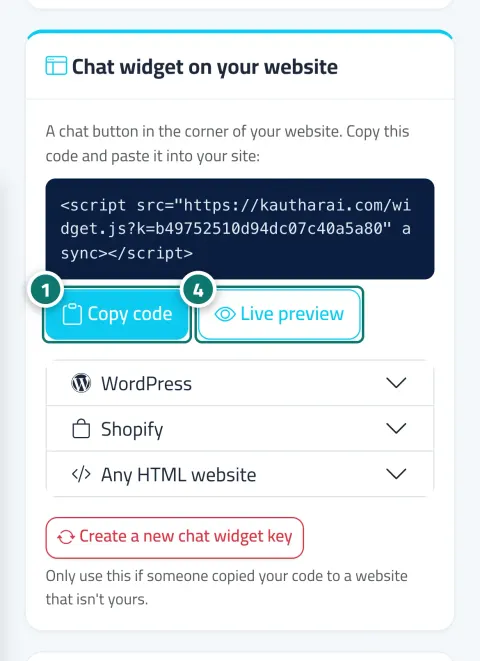
Copy the code and paste it before </body>. A button in your brand colour appears, a short welcome message after three seconds, and a tap opens the chat window inside the site in the visitor's language. “Live preview” shows the look on a demo site before you install it.
What you gain
Ready instructions for WordPress (footer.php or a plugin such as WPCode), Shopify (theme.liquid) and any HTML site, with a single “Copy code” button.
The code loads after the page has loaded, and the chat window itself loads only when the visitor taps the button.
The widget follows your site's language or the visitor's device language (Arabic, English, French), and Kauthar replies in the same language.
The button and window colour come from “Brand identity”, the position (right or left) from the assistant settings, and its conversations are recorded under the “Widget” channel with the page link.
Three steps
From “Channels” → the “Website chat widget” card, click “Copy code”.
Paste it before </body> in your site's theme (WordPress, Shopify or any HTML).
Open your site and try the button, or click “Live preview” to see it on a demo site.
Step-by-step instructions with numbered screenshots in the user guide
1 parts of this feature
One line per part, as documented in the user guide. Open any title for the steps and the screenshots.
A chat button in the corner of your website with a single line of code — it works on WordPress, Shopify or any site, and speaks your visitor's language.
Real examples
A visitor on a product page asks about the size and shipping; Kauthar answers from the connected store and shows the product card, and the visitor's details include the link of the page they were on.
A visitor on a project page asks about the price and installments, and leaves their name and number to request a viewing, which lands in “Customers” immediately.
A student reading a course page in the evening asks about the start date and how to enrol, gets the answer from the courses file and books their seat.
FAQ
Not if you can edit your theme. If you have a developer, send them the code and they'll add it in minutes. On WordPress you can install the Kauthar plugin instead of pasting code.
No, the code loads after the page has loaded, and the chat window loads only when the visitor taps the button.
The colour from “Settings & subscription” → “Brand identity”, and the position (right or left) from “Assistant settings”; both change automatically without editing the code.
Click “Create a new chat widget key”; the old code stops working immediately and you put the new code on your site.
Yes, the website widget uses the same settings: buttons, suggested questions, registration before the chat and talking to a person.

Your Kauthar account is free — no time limit, no credit card. Then turn on the services you need.
Explore the dashboard with a ready demo account
No credit card Pay only for the services you use Live in minutes